How to turn a free download into a coaching sale
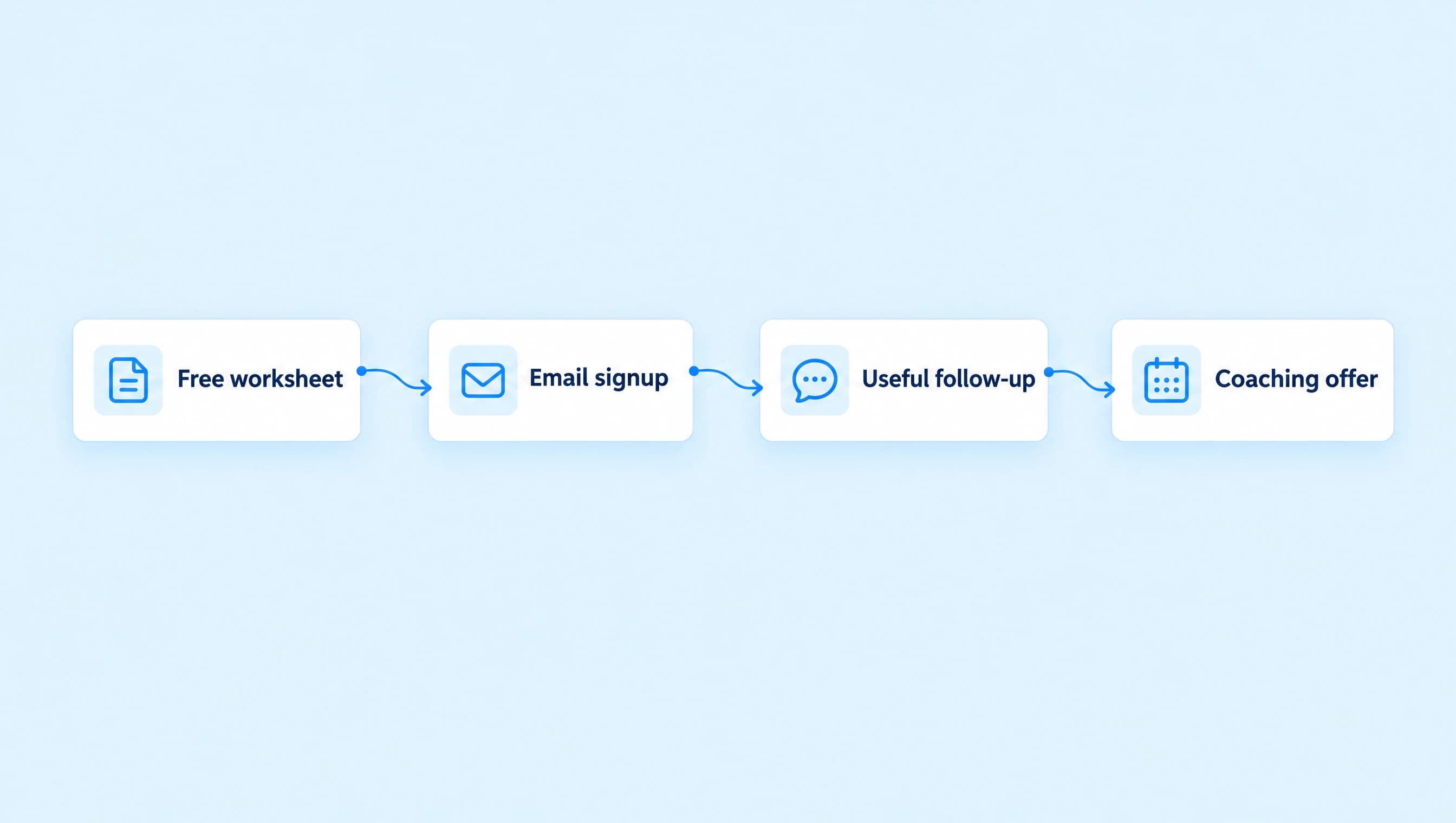
Give subscribers a useful worksheet, help them improve one part of their offer, then invite a discovery call with a three-email sequence.
 LinkStack
Offer a worksheet that solves one small part of your coaching client's problem. Deliver it immediately, send an email that helps them use it, then invite a discovery call. A short sequence gives the reader something to do before you ask them to book.
For Northline Coaching, the starting resource is an offer clarity worksheet for service-business owners. The paid work can cover offer clarity, client acquisition, and delivery. The worksheet helps the owner explain one service well enough to decide what needs work next.
Use three emails: delivery on day zero, a practical edit on day two, and a discovery-call invitation on day five.
Make the worksheet lead to a useful decision
A resource called "Everything you need to grow your business" is difficult to finish and difficult to follow up on. Give this worksheet one job: help the owner explain the offer they want to sell this month.
Keep it to one page with these prompts:
- Who is the service for? Name the kind of client and the situation they are in.
- What problem are they paying you to solve? Use the words a client would use.
- What do they receive? List the deliverables and what they need to provide.
- What question do they usually ask before deciding? Choose one real hesitation.
- What will you change on the offer page this week? Write one edit you can make.
Put the file or page somewhere a reader can open on a phone. Check it while signed out. A permission request or a missing download is a poor first step into a coaching conversation.
Save that destination in Links as Offer clarity worksheet. Prepare a separate Book a discovery call Link for the final email. Both destinations should belong to your business.
Download the offer clarity worksheet and adapt it to the offer you coach people on.
Ask permission for the whole email offer
Explain the sequence before collecting an address. If you promote the worksheet on Instagram, the invitation can say:
Comment OFFER for the offer clarity worksheet and three emails to help you use it, including an invitation to a discovery call. I will send the signup question in your DMs.
The DM question should make the same promise:
What email should receive the worksheet and the three coaching emails? Share your address to subscribe. You can unsubscribe anytime.
In your Instagram workflow's Send Message step, add Data collection. Choose Email as the reply type, save the address to the contact profile, and enable Mark contact as email opt-in because the question explains the subscription. Under Actions on valid input, add the tag Worksheet subscriber.
Keep the tag off the initial comment trigger. A comment is a request to hear about the offer; it is not a validated email signup. Invalid replies, Skip, and expiry should not enter this subscriber sequence. The DM email collection guide covers the collection controls and retry path.
For the valid-reply confirmation, use:
You are subscribed. The worksheet is on its way by email, followed by two short coaching emails.
Use that promise only after the email flow is ready and you have checked delivery to an address you own. An address saved in Audience does not send an email by itself.
Build the sequence in Email Flows
Email sending in this workflow requires Growth. Complete your business name, contact email, and mailing address in Email Settings before publishing. LinkStack checks active email subscription and suppression status before each delivery, including later steps. Read the email preparation guide if a send is skipped.
Open Email Flows, then choose New email flow. Name it Northline worksheet follow-up. Set Start this flow to When a tag is added and choose Worksheet subscriber.
Add three emails with these timings:
| Timing in the editor | Arrives around | |
|---|---|---|
| Your offer clarity worksheet | 0 minutes after the trigger | Signup |
| The question your offer page needs to answer | 2 days after the previous email | Day two |
| Want to talk through your offer? | 3 days after the previous email | Day five |
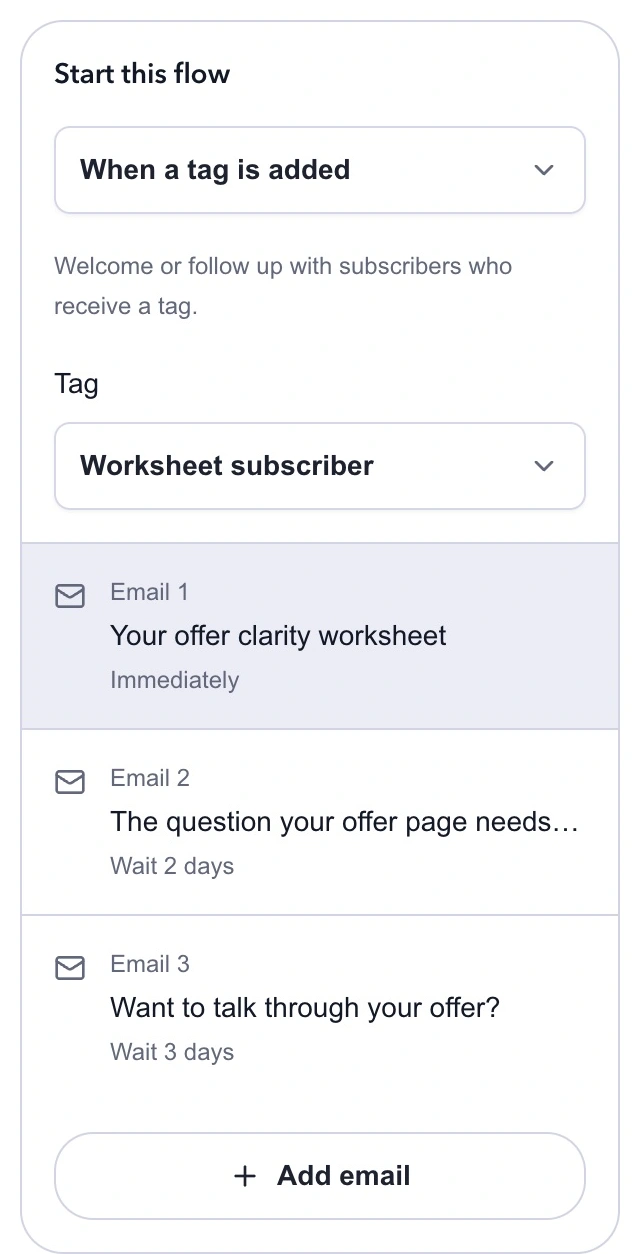
Later waits run from the previous email. Two days followed by three days reaches day five; a five-day wait on the third email would reach day seven.
Choose Start from scratch for each message. Enter its subject and optional inbox preview, then write in the email canvas. Select Add email to extend the sequence. The email flow guide covers editing, reordering, and saved templates.
Email one: deliver the worksheet
Subject: Your offer clarity worksheet
Inbox preview: Start with the sentence your next client needs to understand.
Your offer clarity worksheet is ready. Open it and fill in this sentence: I help [type of client] solve [specific problem] through [service].
Leave out the list of everything you can do for now. Choose the service you want people to ask about this month. Then write the question a client usually asks before they decide.
Use that question in the final box. We will work on the answer in the next email.
Northline Coaching
Add an Open the worksheet button using your saved resource destination. Check the link in the finished email. This tag-triggered flow does not have a purchase event, so use the actual worksheet URL instead of an order or secure-download token.
Email two: help them improve one part of the offer
Subject: The question your offer page needs to answer
Inbox preview: Use one real hesitation to improve the next version.
Look at the client question you wrote in the worksheet. If it is "What do I actually get?", name the deliverables and what the client needs to provide. If it is "Is this for someone like me?", say who the service fits and who should choose something else.
Write a two-sentence answer using details you can stand behind. Skip revenue promises and guarantees you cannot make. Put those two sentences beside the booking or inquiry link on your offer page.
You can reply with the question you chose if you want the coaching team to see where you are stuck.
Northline Coaching
Use a reply-to address you monitor. Someone who answers this email is giving you useful context for a coaching conversation. Read it before sending them a generic invitation manually.
Email three: make the next step clear
Subject: Want to talk through your offer?
Inbox preview: A 20-minute call to decide whether coaching fits.
If the worksheet helped you name the problem but you are still stuck on the next change, Northline Coaching offers a free 20-minute discovery call.
We will talk about the service you sell, what is getting in the way, and whether coaching is a useful next step. The call is a conversation about fit. It does not include a written business plan or ongoing coaching, and there is no obligation to buy.
Choose a time through the booking page if you would like to talk. If you have already booked, keep your existing appointment. You do not need to book again.
Northline Coaching
Add a Book a discovery call button. The booking page should repeat the call's length and purpose. Keep the paid coaching price and terms accurate wherever you present them; the email sequence does not need to invent a package to get someone onto a call.
This simple flow does not automatically learn that a call was booked on an outside calendar. The wording accounts for people who book early. If you later add branches based on confirmed contact data, use Open workflow editor and check every path before publishing.
Download the three-email sequence to adapt the subjects and messages in your own flow.
Publish in an order that preserves the handoff
Save the email draft and check every subject, wait, button, and sender detail. LinkStack adds the sender details and unsubscribe link to delivered automation emails. Do not remove the meaning of the subscription from your signup wording just because a footer is added later.
Publish the email flow before enabling the Instagram collection workflow. A tag trigger reacts to a new tag addition; it does not enroll everyone who already has Worksheet subscriber. Removing and readding the tag just to force another send can repeat messages someone already received.
Use a controlled contact and an address you own to check the signup, resource link, and email path. Confirm that the primary email and active subscription are saved, then inspect the workflow run. Check an invalid address and Skip as separate paths. Do not use your whole existing contact list to test enrollment.
After launch, count subscriptions, confirmed email deliveries, bookings, and coaching sales separately. If people receive the worksheet but never book, read their replies and revisit the worksheet's final question before adding more emails. You need to know what they are still trying to decide.