
How to collect emails from Instagram DMs
Ask for an email inside a DM workflow, save it to the contact, and keep the follow-up useful.
5 min read
In this article
When to ask
Ask for email after the person has shown intent. A comment, story reply, product question, or button tap usually works better than asking cold.
Steps
- Open Dashboard, then Automations.
- Create or open the Instagram workflow that should collect the email.
- Add or select a Send Message step.
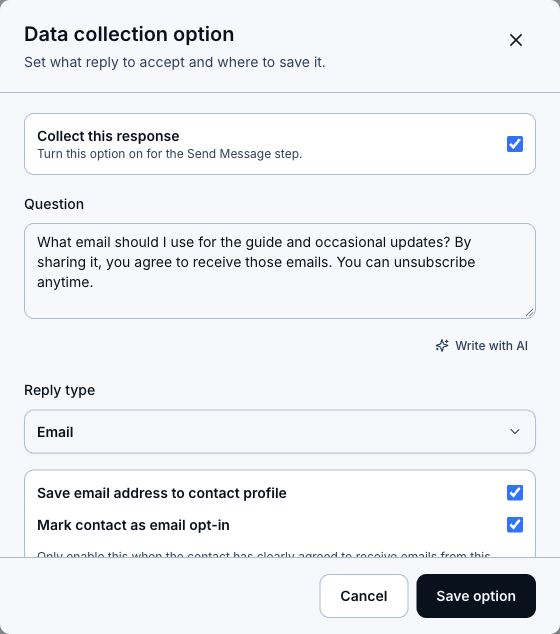
- In Message sequence, add a Data collection option.
- Write a short question, like "What email should I send it to?"
- Set Reply type to Email.
- Save the answer to the contact profile email field.
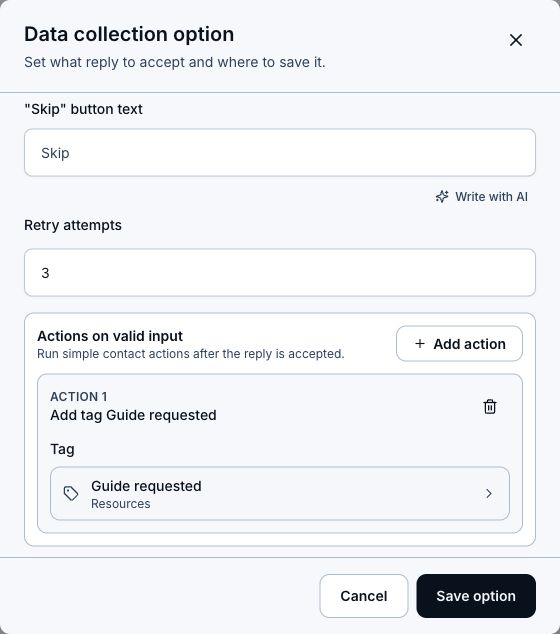
- Add a retry message for invalid email replies.
- Optionally add a tag like Lead, Guide requested, or Launch interest after valid input.
- Connect the valid-answer path to the message that delivers the requested guide or link.
- Test the workflow with a valid email and an invalid reply, confirm the email and tag appear in Contacts, then turn the automation on.
Copy that works
- Say why you need the email.
- Ask once, clearly.
- Avoid pretending the person joined a list before they actually gave permission.
- Use the tag or user field only if it will make follow-up better.
- Keep the next message useful, not just louder.
Where emails go
Collected emails are saved to Contacts. From there, you can search, inspect the contact, export when needed, or use tags and fields in future workflows.
Related articles
Still need help?
Support & feedback