
Post the product. Automate the link.
Someone comments GEAR. Your workflow sends the product link. One saved Amazon link routes shoppers to the regional destinations you've set up.
Free plan available. No credit card required. Compare plans

Send the link while they're interested.
Add "Comment GEAR" to your caption, choose the posts it applies to, and save the product link your workflow should send. Matching comments can start a DM. You can also set up replies to product requests in DMs and Story replies.
Connect a professional Instagram Business or Creator account before publishing. Delivery follows Instagram's messaging windows and rate limits.
An example workflow
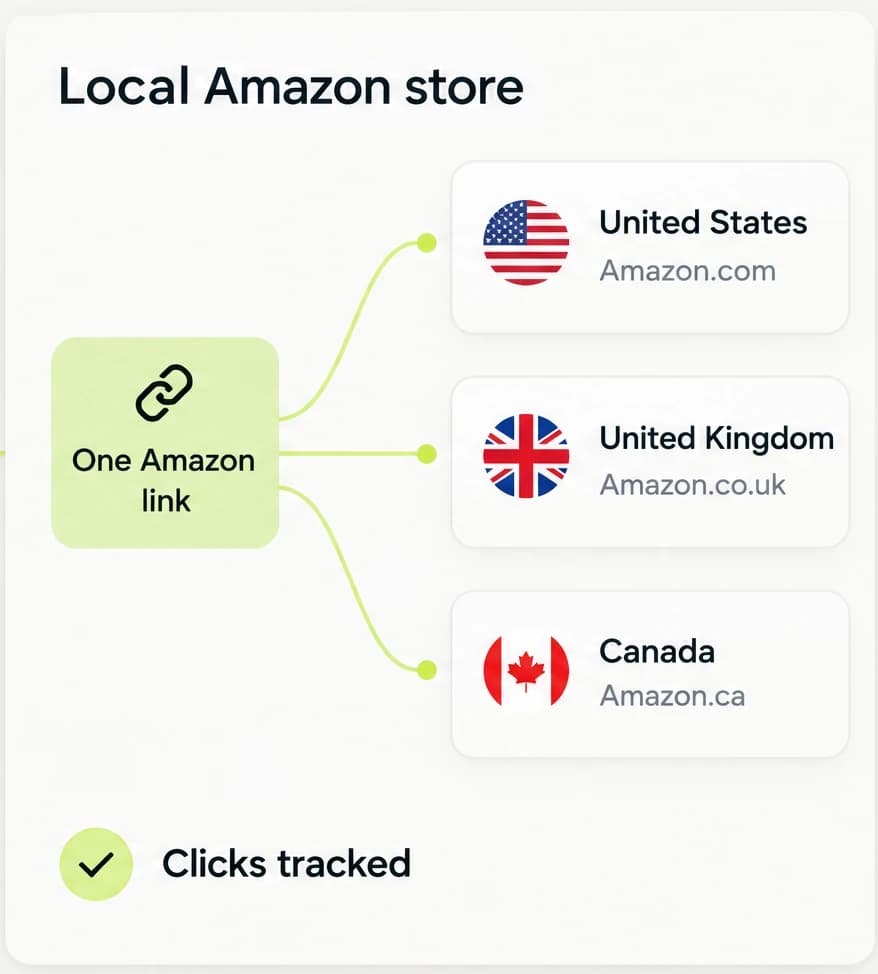
One Amazon link. Their local storefront.
Save destinations on Amazon.com, Amazon.co.uk, and Amazon.ca with the affiliate tag for each market. LinkStack uses the shopper's detected country to choose an active saved destination. Shoppers without a country match reach your default destination.
Use markets covered by your Amazon Associates enrollment and review each saved destination before sharing. Product availability varies across stores; LinkStack does not guarantee an identical item or monitor stock.
See which links people use.
Check clicks, visitor countries, sources, and final destinations for each Link. If a country keeps reaching your default store, use that traffic to decide where to add a regional destination.
LinkStack reports click activity. Use Amazon Associates to review orders and commissions.
Which link?
See the links people click.
Which country?
Find out where visitors come from.
Which destination?
Check the store they reached.
Sell the guide behind your recommendations.
Turn your product knowledge into a buying guide or a paid resource. Put your own offers beside your affiliate links on your LinkStack page, then use an Instagram workflow to send the saved product page when someone asks.
Which Instagram accounts can connect?
Instagram Business and Creator accounts. Personal accounts need to switch to a professional account first.
Which countries can I monetize, and what accounts do I need?
Start with markets such as the US, UK, Canada, and Australia; Programs lists the available storefronts. You need Amazon Associates enrollment that covers each market and a valid tag for that store. Add only markets you are eligible to monetize. LinkStack does not enroll you or create affiliate tags.
Will Amazon shoppers reach the same product? What happens when it is unavailable?
LinkStack starts with the same product ID (ASIN) in each store. During setup, it checks other storefronts where possible. If a product appears unavailable and the source URL contains search words, it can save a local search-results link. Otherwise the same-ASIN link may remain unverified. It does not choose an equivalent product or monitor stock after setup. Review each destination and set a local URL yourself when needed.
Where can I see each click for a Link?
Open Links, choose a Link, and scroll to Click feed. It shows 10 counted clicks per page for the selected date range, newest first, with the time, approximate location, device and browser, source, campaign, route, and destination. Bot and test traffic is excluded.
Have a product people keep asking about?
Start with that link. Set your keyword, write the reply, and check the destinations before your next post.
Start with the free plan.