Send affiliate recommendations from Instagram comments
Send a microphone guide after a MIC comment, keep the affiliate disclosure visible, and check the guide’s product links before promoting the Reel.
 LinkStack
To send an affiliate recommendation after an Instagram comment, match a keyword to the post and deliver the promised product page or guide in a DM. Keep the affiliate relationship clear alongside the recommendation, and check that your affiliate program permits the way you plan to share its links.
Use MIC to send a creator microphone guide. The guide helps readers compare options for recording their content, while the DM gets them to the exact resource mentioned in the Reel.
Decide whether the promise needs a product link or a guide
If a Reel demonstrates one microphone and viewers ask for that exact model, a direct product link can answer the request. If the Reel explains different recording setups, a short comparison guide gives you room to explain which option fits each setup.
For this workflow, the offer is the guide. Its page should help a reader answer practical questions:
- Will this microphone work with my phone, computer, or camera?
- What extra cable, receiver, or adapter would I need?
- Does it suit a stationary desk setup or a moving recording setup?
- What are the limitations that might make another option a better fit?
Explain how you know what you are recommending. Distinguish your own experience from manufacturer specifications. Keep dates beside prices if you include them, because a price in a Reel can outlast the offer it describes.
Finish the guide and open every destination before building the automation. Replace stale or mismatched product links before sending readers to the page.
Put the disclosure where the recommendation appears
For endorsements that reach U.S. consumers, the FTC’s disclosure guidance says material relationships should be clear and disclosures should appear with the endorsement. A disclosure hidden on a profile or About page can be missed.
Apply that to the Reel, the DM, and the guide. The DM can say:
It includes affiliate links, so I may earn a commission if you buy through them.
That sentence describes the arrangement plainly. Adjust it if your relationship includes something else, such as a paid sponsorship or a free product. Follow your program’s required wording and sharing rules too; one network’s permissions do not establish another’s.
The same FTC guidance says a video endorsement should include its disclosure in the video. Put the disclosure into the recommendation as you make it, instead of relying on a message the viewer may never request.
Match the Reel’s request to MIC
Make the CTA describe the page you will send:
Comparing mics for your content? Comment MIC and I’ll DM the creator microphone guide. The guide includes affiliate links, and I may earn a commission if you buy through them.
Keep the guide’s name recognizable across the Reel, message, and destination. “Creator microphone guide” should not lead to an unrelated storefront or a general list of every product you promote.
Connect your Instagram professional account and check current automation access and limits. In Automations, create a custom workflow with a Post or Reel comments trigger and a Send Message step. The Share affiliate links workflow template is also a starting point if you already have a saved destination Link.
Name it “MIC · Creator microphone guide.” Set Words to MIC and remove starter keywords that do not apply. Choose Specific post for an existing Reel. If you are preparing the Reel in advance, Next post lets you publish the workflow first and use the next post for this offer.
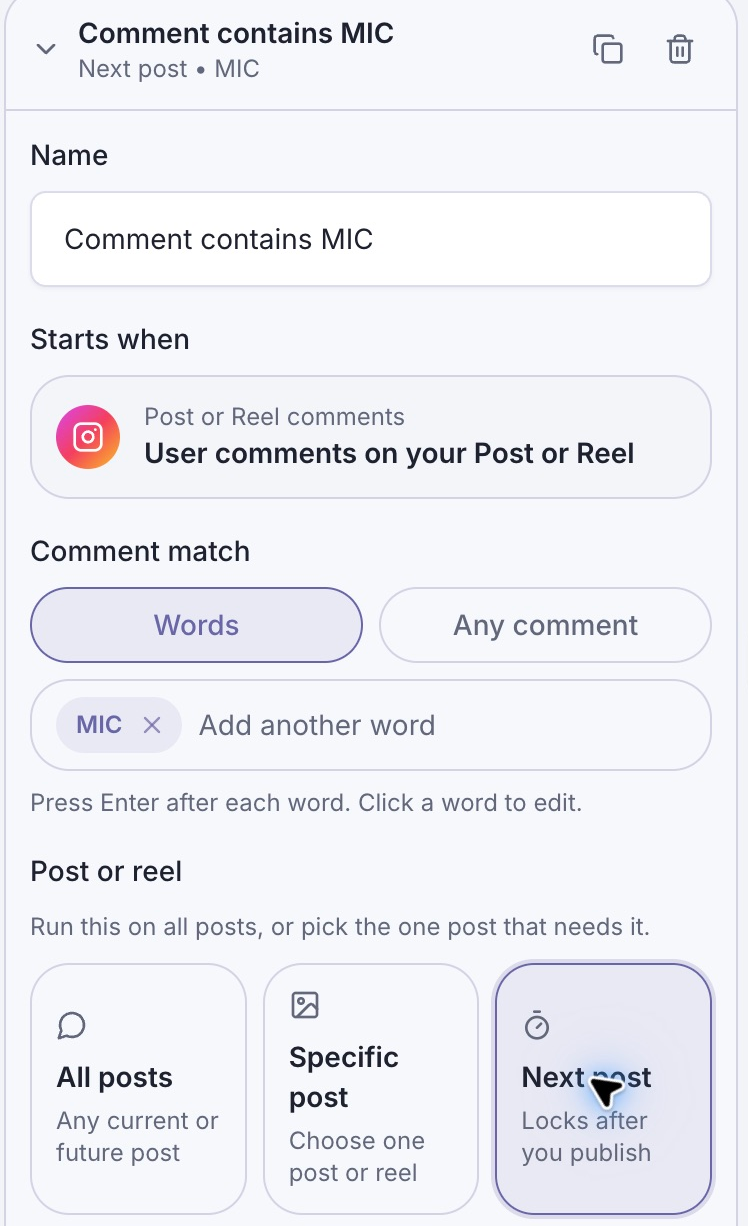
MIC is the request word for this guide. With Next post, the next post you publish must be the intended microphone offer.
Use the comment-to-DM help guide for the complete connection, scope, and live-test instructions. Keep public replies optional; “Sent the mic guide. Check your DMs.” is enough if you want one.
Write the message people asked for
In the Send Message Text block, use:
Here’s the creator microphone guide from the Reel. It includes affiliate links, so I may earn a commission if you buy through them.
Add one button labeled Read the mic guide so recipients know which resource they are opening.
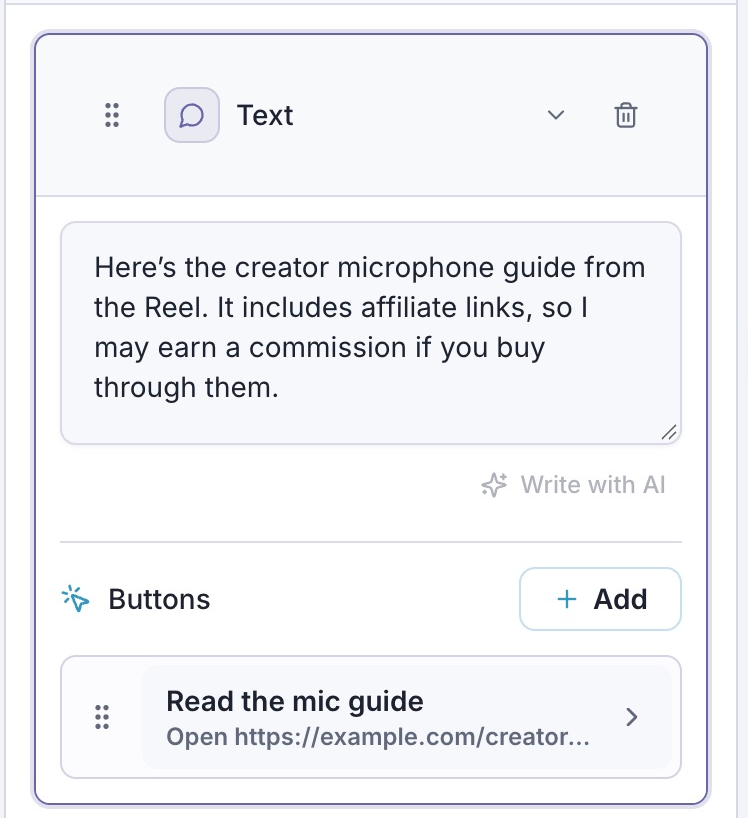
The disclosure stays in the message with the recommendation. This screenshot shows a sample draft in the real editor.
In Edit button, choose Open website and paste the guide’s public URL into Website URL. Click Done and wait for the draft to save.
Use your finished guide’s URL. Test that page and its affiliate destinations separately.
If you manage the guide as a saved Link, choose Open Link and select it instead. Keep its title specific enough that you will not accidentally choose a different recommendation later.
The workflow does not need a second sales message to fulfill this request. Let the guide do the comparison work. If you change the offer later, update the Reel’s promise, DM, and destination together.
Check the path before promoting the Reel
Run Check and inspect the message in Preview. A successful graph check is useful, but it does not verify Instagram delivery or affiliate attribution.
With an active Instagram connection, use the draft Test from another Instagram account to inspect the DM and its button. After publishing the workflow, leave a fresh MIC comment on the intended Reel. An ordinary comment will not start an unpublished draft.
Check these outcomes separately:
| Part of the journey | What a successful check establishes |
|---|---|
| MIC comment | The intended comment trigger starts. |
| Received DM | The guide message and disclosure are visible. |
| Guide button | The correct guide opens on a phone. |
| Product links inside the guide | Each link goes to the intended product with the configured affiliate information. |
| Affiliate reporting | The network reports any eligible attribution or commission under its own rules. |
Do not use a click count as a sales count. Link delivery, guide visits, and credited purchases describe different events. Review automation metrics for the message journey and your affiliate dashboard for credited results.
If someone receives the wrong guide, check the trigger’s post scope and button destination first. If the guide is right but a product link is wrong, fix the guide before directing more traffic to it. When the recommendation changes, test the new destination through the same message a reader will receive.