
Manychat alternatives for Instagram: test the whole comment-to-DM flow
Compare LinkStack, Beacons, and Stan AutoDM using one real task: deliver the requested link, check it on a phone, and understand what can happen next.
If you're looking for a Manychat alternative for Instagram, start with the job your current workflow needs to do. LinkStack, Beacons Smart Reply, and Stan AutoDM can each belong on a creator's shortlist. Their surrounding tools differ, so test the message and its destination together.
Use one task you actually need: someone comments GEAR on a Reel and receives the link to the microphone in the video. Build that example before moving your other automations.
Compare the tools around your workflow
Manychat's comment trigger supports post or Reel selection, keywords, public replies, and a private message. If that already handles your needs, keep it in the comparison as your working baseline.
LinkStack is worth testing when you also want managed links, a bio page, products, and your creator inbox together. The same saved link can appear on your page and in a workflow. Routing and app-opening behavior still depend on the destination, device, and your settings.
Beacons Smart Reply supports comment, Story, and DM triggers and can send an external URL or a Beacons destination. Consider it if you're already using the Beacons store and email tools.
Stan AutoDM can send people to a Stan product, community, or email-collection landing page. Try that path if your sales already happen in Stan.
Check each tool's current plan and usage terms against your expected activity. A feature list alone won't tell you whether the editor fits the way you work or whether your chosen plan includes everything you need.
Build one small test in LinkStack
You need a professional Instagram Business or Creator account and an active connection before publishing or running a live test. You can prepare a draft first. Check your account's automation access and plan allowances, then choose the saved destination you want to send.
- Open Automations, choose New automation, and select the Send link on keyword workflow template. Choose the destination and click Use template.
- Open the trigger. Set Starts when to Post or Reel comments, choose Words, and enter
gear. The trigger's name is a label; Words controls the match. - Choose Specific post and select the Reel you intend to use. For this test, one post makes it easier to check that the correct comment triggers the reply.
- Edit the Send DM text and its button. A plain message works: "Here's the mic from the ride video." Set the button title to "See the mic," choose Open Link, and select your saved link.
- Run Check and inspect Preview. Preview sends nothing, and its button does not test the destination.
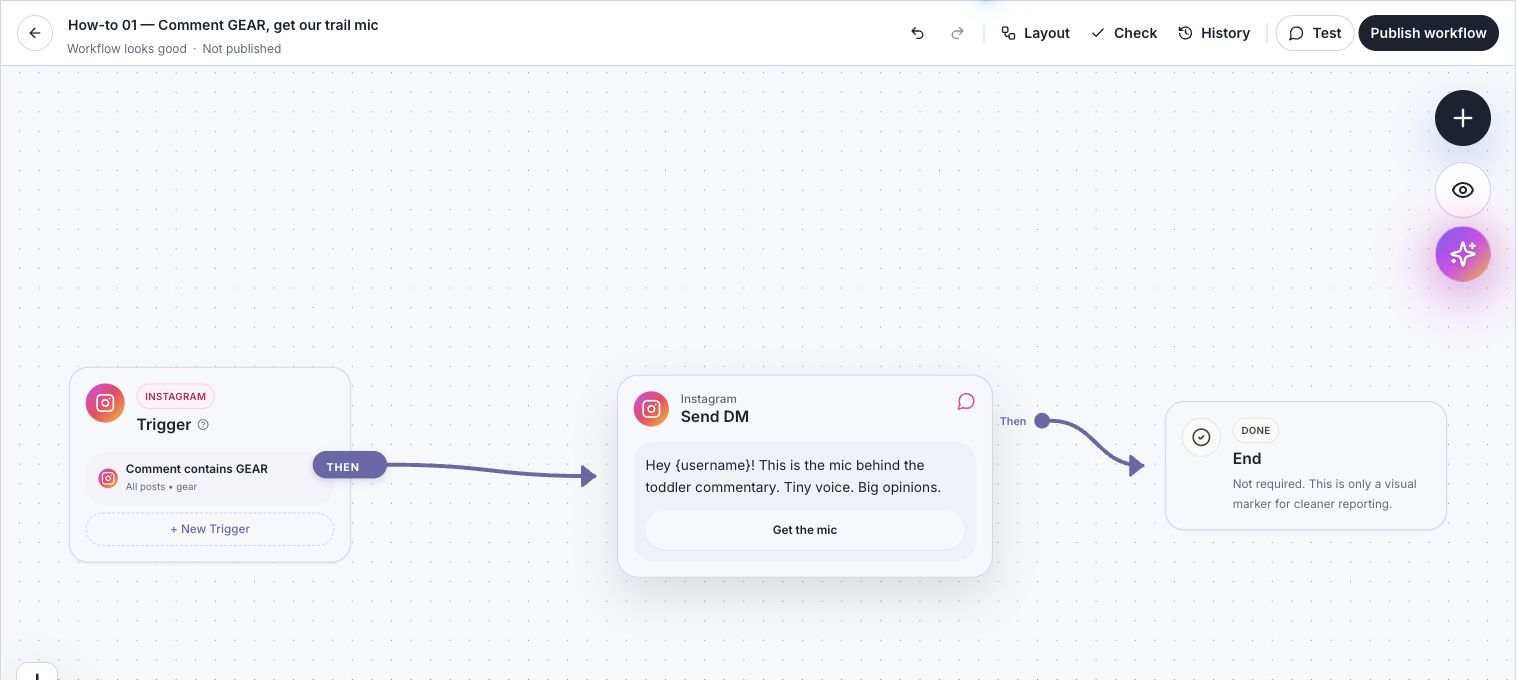
This saved demo draft shows the comment-to-DM path. It uses All posts and a Get the mic button; the test above uses a specific Reel. The screenshot does not show a delivered message.
The full screenshot walkthrough shows the trigger, message, button, and live-test controls.
Know what the first DM allows
A public comment does not open an ordinary 24-hour Instagram messaging window. A person's reply or qualifying message-button interaction can open that window. An Open website button does not. Manychat documents that distinction in its comment-trigger guide.
In LinkStack, the first comment private reply contains one text, image, or audio block. A text block can carry the requested link button. Put additional messages in a later Send Message step; those steps wait if the contact needs to open the messaging window.
This matters if you want to follow a link with another message. Clicking the microphone's website link alone does not authorize that follow-up. Read the messaging-window guide before adding a sequence.
Test delivery and the destination separately
With Instagram connected, choose Test and use a different Instagram account to send the one-time code shown in the test panel. This sends a real DM. Confirm that the message arrives and the button opens the intended page.
After publishing, leave a fresh GEAR comment from the second account on the selected Reel. That checks the actual comment trigger. Inspect Automations activity for the result, then check the destination on the phone people will use.
Repeated test comments can be suppressed. In LinkStack, the same person can start the same automation once per post for each configured keyword, with no time reset. If a run doesn't send, inspect delivery troubleshooting before rebuilding the workflow.
If you are weighing comment replies against sending people to your profile, auto-DM versus link in bio covers that choice.
Keep Manychat if you only need different links
You can paste an active LinkStack URL into a Manychat message without moving your workflows. LinkStack manages the link destination; Manychat continues to send the message.
LinkStack also has a limited Manychat connector beta. It is not a generally available marketplace installation, so use the connector guide only if your account has access.
If you want to try the combined workflow, open Automations and save one draft. Compare the setup effort and the delivered result before switching the rest.