
How the 24-hour messaging window works
Know Meta's 24-hour window for Instagram DMs and Facebook Messenger, plus Instagram's one-time private reply allowed after a comment.
6 min read
In this article
Short version
Normal Instagram DM automations and Facebook Messenger Inbox replies operate inside a rolling 24-hour window after the contact messages or interacts with your business in chat. An Instagram or Facebook Page public comment follows a separate rule: LinkStack can send one private reply to that comment within seven days, but the comment alone does not open a normal 24-hour DM conversation. The person has to interact with the private reply before ordinary DM follow-up continues.
What opens or resets it
- A user sends a DM.
- A user replies to a story.
- A user taps a quick reply or postback button that sends an interaction back through Meta.
What does not reset it
- A public comment by itself does not open or reset the normal 24-hour DM window.
- A Link click by itself does not reopen the Meta messaging window.
- A web URL button click does not count the same way as a quick reply or postback.
- An outbound automation message does not extend the window. The contact has to interact again.
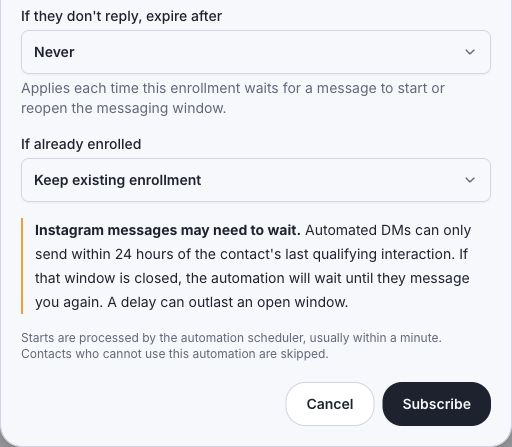
- A fixed Delay step can push a workflow outside the window, so keep Instagram DM follow-ups under 24 hours unless the user replies again.
What LinkStack does
- Tracks the inbound event time that started or resumed the automation.
- Allows normal automated Instagram and Facebook Messenger DMs while the 24-hour window is open.
- Allows one comment private reply during the separate seven-day window.
- Queues high-volume comment private replies at a conservative pace and automatically retries definitive Meta rate limits.
- Skips expired automated Meta sends with a messaging_window_expired status, without asking Meta to send them.
- Keeps public comment replies separate from DM window checks.
- Keeps manual inbox replies behind the provider reply window shown on the conversation.
Channel notes
- LinkStack supports Instagram automations and Facebook Messenger Inbox conversations for eligible accounts. Facebook comment and Messenger workflows are also available when enabled for the account.
- Facebook Messenger needs Page message access and follows the same 24-hour Meta messaging-window model.
- Always-open messaging assumptions from other channels should not be copied onto Instagram automations or Messenger Inbox replies.
Meta docs
Meta owns these rules and can change enforcement. Check Meta's documentation when planning campaigns or support flows.
Related articles
Still need help?
Support & feedback
Comment private replies