
Online media kit examples: show brands what they can buy
Two fictional creator examples show how to describe your audience, choose useful stats, present work, and make a partnership inquiry easy.
An online media kit should let a brand understand your work, check whether your audience fits, and ask about a specific project. Put a short introduction near the top, then show evidence that helps someone decide whether to contact you.
The two examples below are fictional writing samples. Their creators and offers illustrate how to organize a kit; they are not customer profiles or reported campaign results.
Example 1: a family outdoor creator
A creator who films family bike rides could open with:
I make short films about getting outside with a young kid, including the snack stops and very serious arguments about sticks. My audience follows for family rides, practical gear, and the bits that never make a tidy parenting reel.
The next section can explain the available work:
Partnership ideas: a Reel showing how a product fits into an actual family ride, or a set of short videos a brand can use on its own channels. Send the product, intended use, and campaign dates with your inquiry.
Pair that introduction with a relevant ride video and a product demonstration. A brand selling a bike seat should be able to find the bike footage without scrolling through unrelated work.
If the creator has previous paid collaborations, each project can identify the deliverables and link to the finished work. If they haven't done one yet, personal projects can demonstrate their filming and editing. Label those as personal work and leave the brand-collaboration section empty.
Example 2: a tutorial creator who also makes UGC
A maker or home creator might use a different opening:
I film practical tutorials for people fixing up small spaces. My videos show the tools, the awkward corners, and the finished result. I also make product demonstrations for brands to publish on their own accounts.
Their work samples should distinguish a sponsored post from content produced for a brand's channels. Those projects can require different deliverables and usage terms.
An example offer could read:
One vertical tutorial with captions and one round of revisions. Tell me where you plan to use it and for how long. Paid advertising, extra edits, and additional formats need a separate quote.
This gives a prospective partner enough detail to ask a useful question. Replace the sample scope with terms you actually offer. A media kit can start the conversation; confirm the final deliverables and permissions in the project agreement.
Choose statistics a brand can interpret
Show each statistic with its platform and reporting period. "Reel views in September" tells the reader more than an unexplained "views" number. Keep account totals separate from one unusually popular post, and date screenshots or manually entered metrics.
If you share audience location or age data, use the breakdown available from the platform. Leave unavailable fields out. Adding follower counts from several profiles produces a combined count, not a count of unique people across those accounts.
For a campaign example, attach performance to the actual content and the period measured. Never invent results to fill an empty section. A video sample can show what you make even when you have no sponsor metrics to report.
Give rates enough context
A rate without a deliverable forces a brand to guess. Describe the format, where it will appear, and what the quoted amount includes. A range or "quote after brief" can make sense when scope varies.
Choose whether rates belong on the public page. You may prefer to show your work openly and share pricing after you know the request. Keep the inquiry form short enough to finish: contact details, brand, proposed project, timing, and optional budget are a useful starting point.
Build it in LinkStack when your account has beta access
LinkStack media kits are currently in an invite-only beta. Invited accounts need a bio page first. If Media Kit is missing from your account, creating another account or upgrading does not automatically grant access.
Open Link in Bio, then Media Kit. Choose the bio page that should supply your starting identity and appearance. Connect an Instagram Business or Creator account, or choose Skip for now to create a draft. Later bio and media-kit edits are independent.
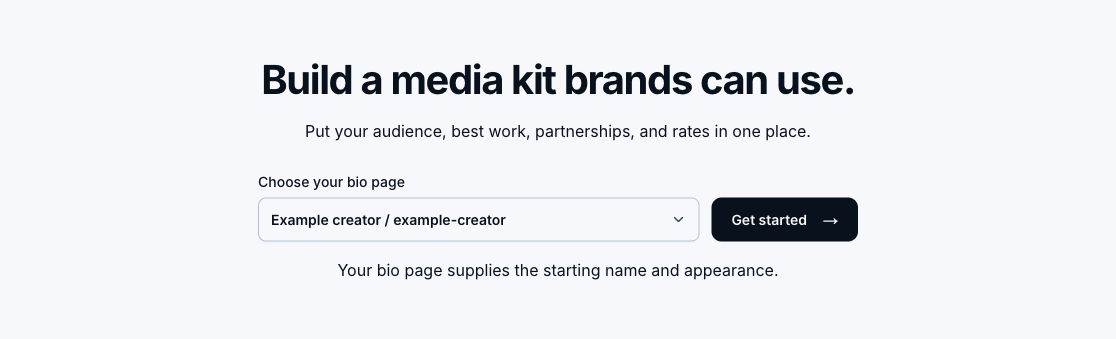
Choose the existing bio page that should supply your kit's starting name and appearance.
In the kit, add your introduction, selected work, and any real collaborations. Connected statistics remain read-only. You can choose what appears, while manually entered metrics are labeled Creator-provided and keep their own dates and periods.
Choose Public, Verified email, or Passcode access in Settings. When the whole kit requires verified email, that verification also unlocks rates. Public and passcode-protected kits can have separate rate restrictions.
Publish the bio page before publishing its kit. Draft edits autosave, but Publish is what makes them public. Copy link then gives you the shareable kit URL. LinkStack currently has no PDF export.
If your account has beta access, sign in to read the media-kit setup guide, which covers publishing and inquiries. Before sharing, read your kit on a phone and check every work sample. Then open Media Kit to finish the draft your account can access.