
How to build a routed Link
Build one durable URL, route each visitor well, test the fallbacks, and use the click data to keep improving it.
9 min read
In this article
When to add routing
Create a Link for every shareable destination. Add routing when the best destination can change by country, device, app, or affiliate storefront; keep one fixed destination when everyone should reach the same web URL.
- Use one for product links with country-specific storefronts.
- Use one when mobile visitors should open a supported app.
- Use one when affiliate tags or destinations vary by country.
- Use one when you need routing, fallbacks, pixels, and route analytics attached to the same public URL.
Create the Link
Create a Smart Link on Home opens guided Destination, Review, and Share steps. It uses the same review form inline, with optional program and slug fields under More options. Links, bio setup, the bio editor, and automation quick creation use the modal described below. Nothing is created until you confirm. Creating from a bio page or automation adds the saved Link to that surface.
- Open Dashboard, then choose Links.
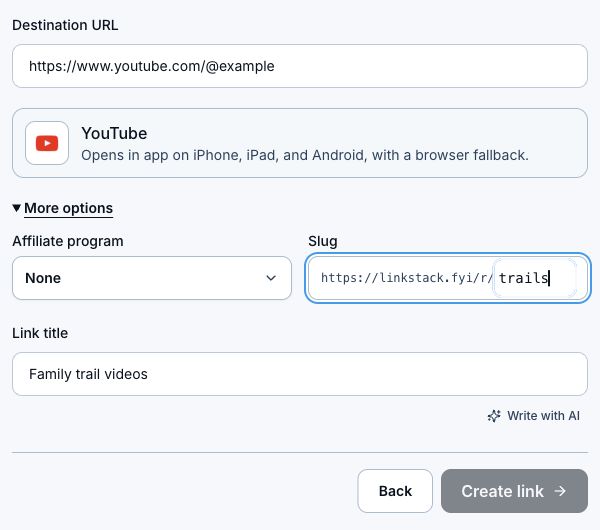
- Paste the direct product, page, post, video, or storefront URL, then choose Create link to open the review modal.
- Wait for LinkStack to check the URL, detect supported app behavior, and suggest a public ending.
- Add a clear Link title. This also becomes the initial button title when creating from a bio page.
- Review the detected app and browser fallback. Choose an affiliate program or None, then edit Slug if you have Growth or existing custom-slug access. These settings are visible in the modal.
- Check that the ending is available, then click Create link. Guided Home setup labels this action Create Smart Link and offers an optional next step into Instagram automation with the new Link selected.
Configure destinations and routing
- Open the new Link and verify its title, public URL, and primary web destination.
- Open Routing.
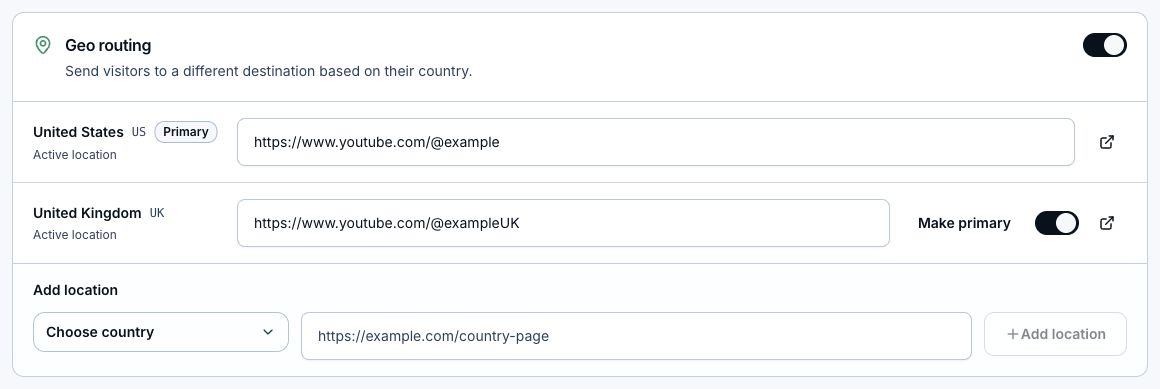
- Keep one live primary destination that works for visitors without a more specific match.
- Add or enable country destinations only when you have a valid localized URL or storefront.
- Review app routing. Use automatic app behavior when the provider supports the pasted URL, or add custom app destinations when your plan and use case require them.
- Add manual routing overrides only for a specific audience that should not follow the normal country or device route.
- Save each section you changed.
Add campaign tracking and pixels
- In Routing, expand Tracking to add UTM source, medium, campaign, content, or term values.
- LinkStack applies campaign tags to the routed destinations while preserving useful affiliate parameters.
- Save reusable pixels from the Pixels tab, then assign them from the Links list or the link's Tracking section.
- A LinkStack pixel fires on an eligible Link click before redirecting. Purchases and other destination-site events still need tracking installed on that site.
- Pixels stay blocked for detected EU, EEA, UK, and Swiss visitors.
Test before sharing
- Copy the public Link instead of the destination URL.
- Open it once on desktop and confirm the normal web fallback.
- Test on iPhone and Android when app handoff matters.
- Test inside Instagram or TikTok when the link will be shared there; in-app browsers can behave differently from Safari or Chrome.
- Confirm every live country destination opens the intended storefront and keeps the right affiliate tag.
- Try a visitor path without an exact match and confirm the primary fallback is still useful.
Read the results and improve the route
- Total clicks show volume. Countries and devices show where routing coverage matters.
- Referrers and platforms show which placement sent the traffic.
- Route outcomes show whether visitors reached an exact destination or used a fallback.
- A high fallback rate usually means a country, device, or app path needs better coverage.
- You can update destinations, routing, campaign tags, and pixels without replacing the public Link.
Keep the link manageable
- Choose a short, readable ending before creation. The public ending stays stable afterward.
- Use separate Links for separate campaigns or placements when you want clean analytics.
- Archive old or inactive links instead of deleting their history.
- Do not archive a Link that is still used in a bio page, automation, email, QR code, or paid campaign.
Related articles
Still need help?
Support & feedback