LinkStack vs. Manychat for digital downloads
Compare Instagram replies, Manychat contact charges, checkout and file delivery for a workout planner.
For a fitness coach offering a workout planner through Instagram, LinkStack is our pick when you want the product page, download delivery and reply workflow in one account. Manychat deserves a look when you need conversations across several social channels or already have a checkout you want to keep.
Compare the whole task: someone asks for the planner, reaches the right page and gets the file. Sending the first DM is only one step.
Choose around the planner and the channels you use
LinkStack lets you create a digital product, use its published page in an Instagram comment workflow, and add it to your bio page. For a coach starting with one download, that keeps the offer and its promotion together.
Manychat's current Pro documentation lists Instagram, Messenger, WhatsApp, TikTok, Telegram, SMS and Email among its supported channels. Plan and account availability apply. If WhatsApp conversations are essential to your business, include that requirement before choosing a tool around Instagram alone.
| Your situation | What to prioritize |
|---|---|
| You need a home for the planner and an Instagram reply workflow | LinkStack's product page, configured file delivery and automation |
| You already sell the planner elsewhere | Keep the working checkout and compare how each tool sends people there |
| You need conversations across several social channels | Manychat's channel support and the plan available to your account |
Compare costs for your planner promotion
Check which billing model your Manychat account uses. Its March 2, 2026 pricing model applies by default to accounts created on or after that date. Older accounts may still use earlier pricing, and availability varies by region. Confirm the plan offered to your account before using these rates.
For that model, Pro includes 2,500 Active Contacts per billing month. These are the published rates checked November 16, 2026:
| Pro billing choice | Base subscription | Each additional Active Contact |
|---|---|---|
| Monthly | $39 per month | $0.05 |
| Annual | $348 paid yearly, equivalent to $29 per month | $0.038 |
The annual subscription is prepaid; contact overages are billed monthly. Prices exclude tax, and the offer can depend on billing country. Check Manychat's pricing against your account.
An Active Contact is someone who interacts with you through Manychat during the billing month. Repeated messages count once in that period. Imported contacts can count when they send or receive a message through Manychat; storing an inactive contact alone does not count. The same person using different channels can count separately, depending on how their accounts are matched. Read the Active Contacts rules before using a follower or saved-contact total in your budget.
For an illustrative Instagram-only promotion reaching 3,000 Active Contacts on monthly Pro, with overages allowed, the calculation is $39 + (500 × $0.05) = $64 in subscription and contact charges. Tax and any other charges remain separate. The contact count is an assumption, not a forecast of requests or sales.
For the full comparison, add your checkout and file-delivery costs to the Manychat path. For LinkStack, check current plan allowances and selling fees, plus separate Stripe processing. Use the tools and activity your actual planner offer needs.
Manychat's Buy Button has a digital-goods restriction
Manychat has a native Buy Button for Messenger and Instagram DMs, with Stripe or PayPal connected. Its Buy Button guide says digital goods cannot be sold through that checkout. Do not choose it to sell a downloadable workout planner.
A website link is a separate action. Manychat's Open website button opens the URL you provide. If that URL is a product page, check the destination's checkout, file delivery and applicable terms separately. A message button alone does not establish how the buyer receives the PDF.
Prepare one planner before building the reply
Use a concrete offer, such as a Weekly Workout Planner with space for two training sessions, equipment and notes. Decide whether it will be free or paid, and make the page say exactly what the person receives.
In LinkStack, choose Add a product on Home, then Digital Product. Add the title, description, price and finished delivery file. Save the draft and preview the page before publishing. The product setup guide covers the editor and delivery settings.
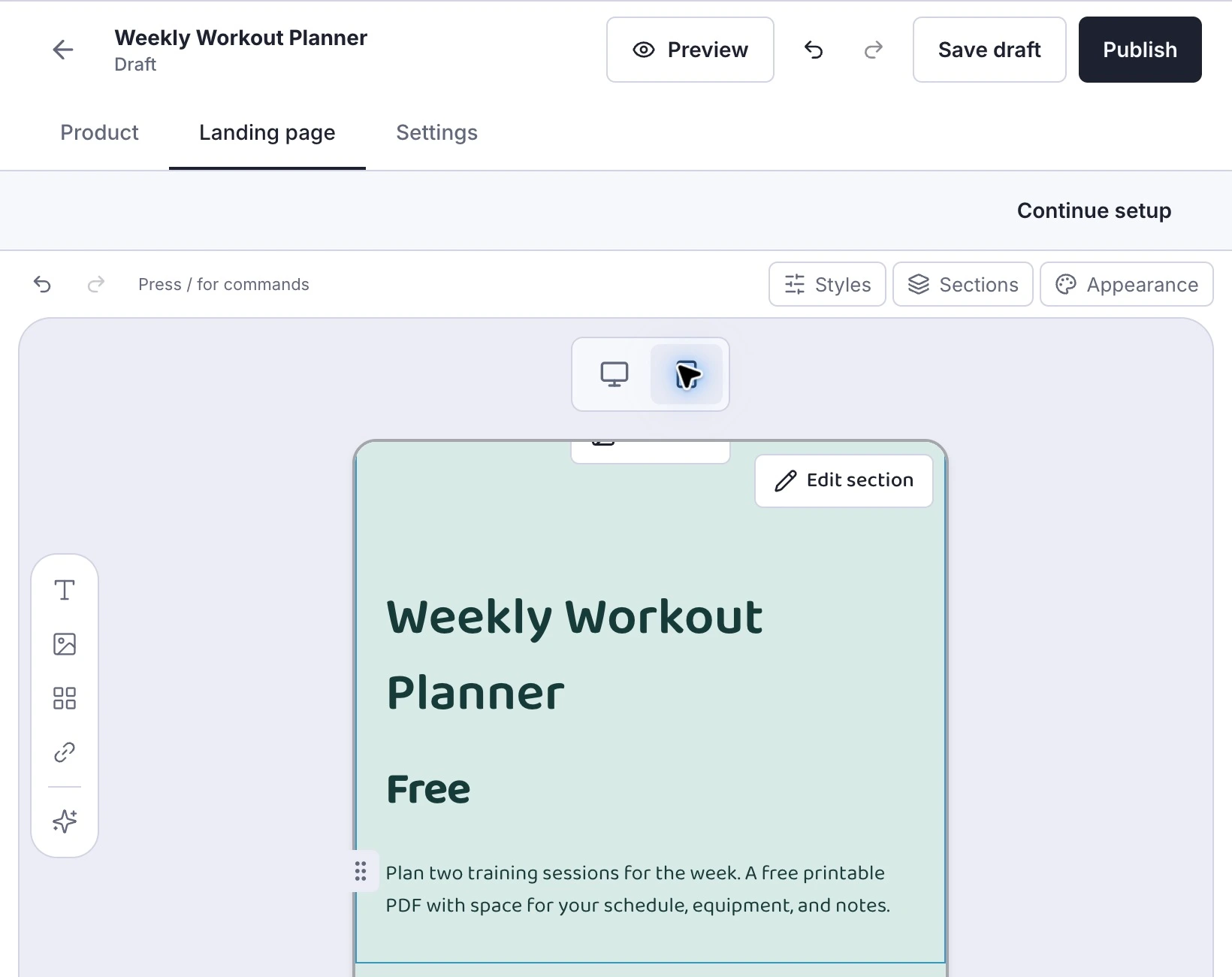
This example uses a free planner. The draft shows the offer and description; it does not demonstrate a completed order.
For a paid planner, connect Stripe and confirm Payments ready before promoting it. A free download without a paid add-on can complete without Stripe. Review the purchase-confirmation settings too: enabled download confirmations provide secure access after a completed paid order or free resource claim.
Send the page when someone asks for it
Use one caption request: "Comment PLANNER for the Weekly Workout Planner." Keep the same name in the DM, button and product page.
In LinkStack's guided Instagram setup:
- Connect your professional Instagram account. Choose the published planner as the message destination.
- Set the trigger to Post or Reel comments, enter PLANNER in Words, and choose the post or Reel for this offer.
- Write a short DM: "Here's the Weekly Workout Planner. Use the button to see what's included." Name the button View the planner.
- Check the conversation preview and destination. Review the workflow before publishing it.
The comment-to-DM guide shows the controls. Its conversation preview simulates the exchange; it does not prove that Instagram delivered a message.
For a post or Reel comment, Meta allows an initial private reply containing one message, sent within seven days of the comment. Further messages require the person to respond and must be sent within 24 hours of that response. A website-button click alone does not open that window. These limits shape both workflows. Meta's private-reply rules and Manychat's interaction guidance explain the boundary.
Make email follow-up an explicit choice
If collecting an email is part of the offer, explain what the person will receive. LinkStack's DM email collection can validate an address and save it to the contact. Ask for permission before using it for marketing.
Manychat also supports email collection and a recorded email opt-in. Its email guide requires appropriate consent for imported contacts and explains its collection controls.
LinkStack marketing broadcasts and email workflows require Growth, sender setup and eligible subscribers. Native download confirmations are separate from marketing follow-up. Compare current LinkStack plans, automation allowances and selling fees before committing to the full sequence; Stripe processing remains separate from LinkStack's platform fee.
Start with one planner and one reply workflow. Check the page and file, then add follow-up when you can explain why the recipient would want it. Open Automations to prepare the Instagram workflow for your offer.