
How to create your first bio page
Claim a handle, add the basics, and publish a public bio page without turning setup into a whole afternoon.
6 min read
In this article
Before you start
Have an available handle in mind. Name, photo, bio, and links are optional; you can add them later.
Steps
- Open Dashboard, then choose Bio.
- Select New bio site, or choose Create your Link in Bio from the first-login Home screen.
- Enter the public handle you want to use.
- Click Continue to reserve the handle as a draft. It is not public yet.
- Pick a style and Continue to save it. If you have not added content yet, the style preview uses example content to show the design; those examples are not added to your draft. Finish in editor is available after Address when you want to skip ahead.
- In Content, create or reuse your most important Links. Create link opens a modal to review the destination app, title, program, and slug; Create and add Link attaches the saved Link.
- Optionally open Add a photo and a little about you for your name, bio, and photo, or Add your social profiles. Each selected social profile needs a valid username or link.
- Choose Review page to save your content and check the actual draft. Edit takes you back to the matching step. Open editor saves the draft and continues to the full editor. A failed save keeps your current step and answers for retry.
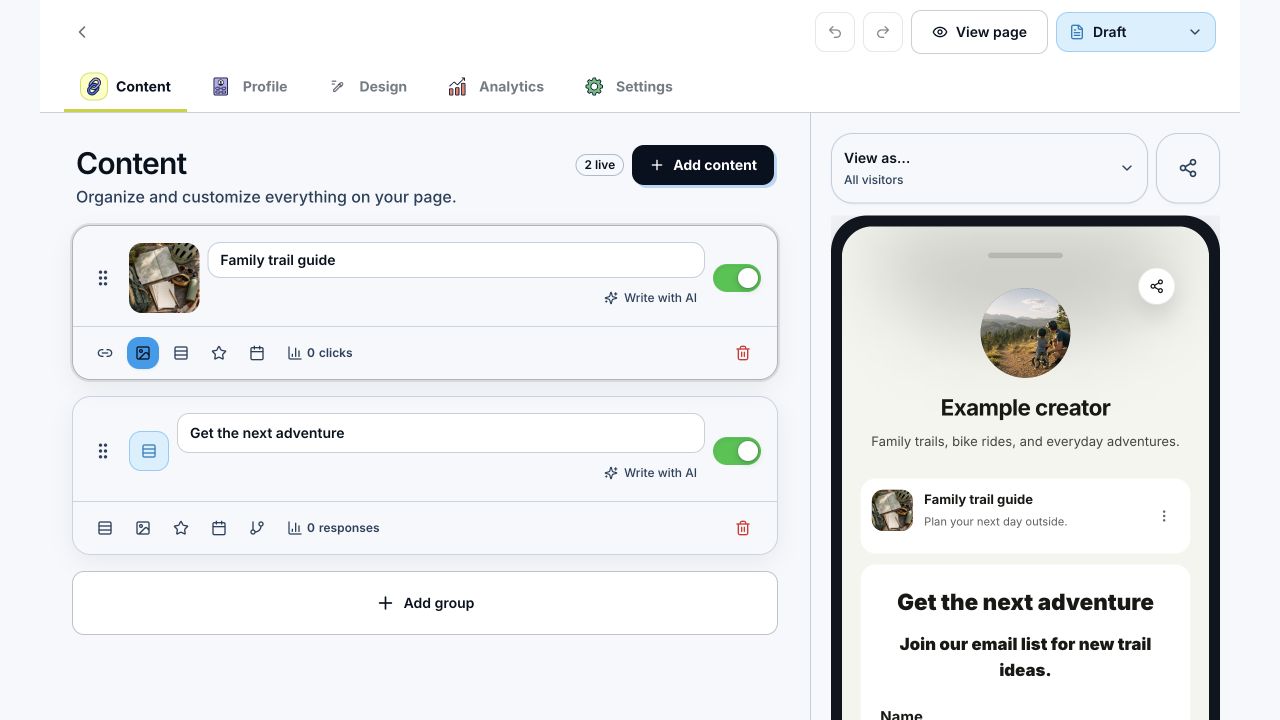
- In the editor, choose Add content to open Add to your page. Click anywhere on an available block card, or Tab to it and press Enter or Space. Connect labels open connection setup; Unavailable cards cannot be selected.
- Check the phone preview. Cards keep their spacing, and the page and LinkStack branding scale together as the preview resizes. Scroll inside the phone to review the lower cards and policy links.
- Click a card, profile detail, or page background in the preview to open its editor controls. On small screens, selecting something to edit closes the preview first.
- Publish the page and open the public preview.
Tips that help
- Lead with the link people came for.
- Keep button labels short.
- Move current campaigns, drops, and videos near the top.
- Use Links when you want routing and analytics attached.
Related articles
Still need help?
Support & feedback