
How LinkStack signup sources and ad attribution work
Understand first-visit UTM and referrer capture, pending email signups, paid click IDs, and gaps in source reporting.
In this article
Read the source of every LinkStack signup
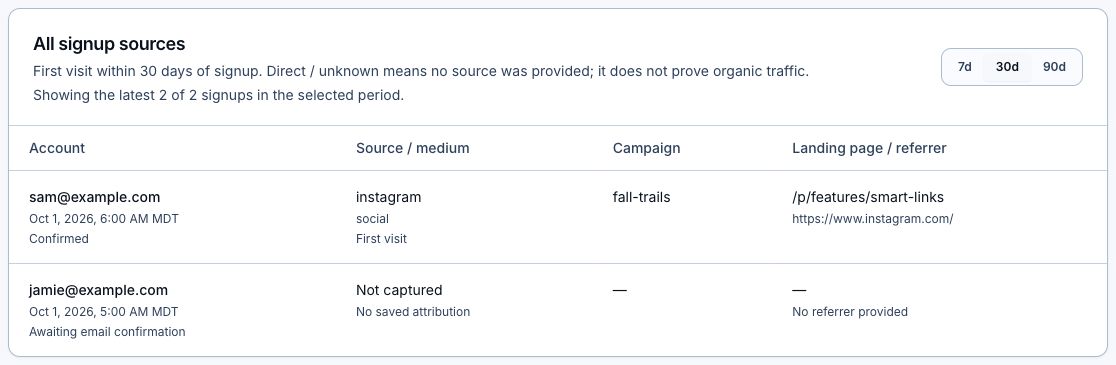
- Administrators can open Dashboard → Admin → Growth attribution and read All signup sources. This private report includes the newest 100 accounts in the selected period, including accounts awaiting email confirmation.
- For one account, open Admin → Users, select the user, and read Signup source. This view includes saved attribution for older accounts outside the growth report's date window. If the source is unavailable, refresh to retry the lookup.
- Read Source / medium, Campaign, and Landing page / referrer together. First visit preserves the earliest captured visit within 30 days; internal navigation and Google authentication do not replace it.
- UTM source, medium, campaign, content, term, and campaign ID are saved when present. Without UTMs, a referring website or an ad-click source hint may still identify the source. These browser-reported values are analytics context, not verified ad-platform attribution.
- Direct / unknown means a visit was captured without a source. Not captured means no saved record is available, including older accounts or visits with privacy/storage restrictions. Neither label proves organic traffic.
- Older saved ad or Link referrals remain visible as existing evidence. Missing historical source data is not reconstructed. The separate paid report still measures the most recent eligible paid visit.
What LinkStack preserves
- An eligible paid visit can include Meta's fbclid, Google's gclid, gbraid, or wbraid, UTM values, campaign and ad IDs, placement, the landing page, and a sanitized referrer.
- LinkStack places those values in an encrypted first-party token for up to 30 days. A later organic visit does not erase the paid touch.
- The token carries no email or LinkStack account ID before signup.
- A completed signup is matched privately to the paid touch, then the temporary token is removed.
Signing in through other apps and browsers
Instagram and Facebook may open a page in their in-app browser, while Google sign-in finishes in another browser. LinkStack carries an encrypted record of the paid visit in the approved sign-in return URL to keep the original ad click attached. If Google returns only an authentication code, LinkStack can recover the signup details from a new account's first provider session. Later Google logins are not counted as registrations.
What each provider receives
- Meta receives CompleteRegistration from the browser and server with one shared Event ID for deduplication. The server copy can include the retained Meta click and browser IDs plus hashed account identifiers, IP address, and user agent.
- Google receives the configured signup conversion. A retained Google click parameter is restored on the post-signup URL until the browser tag queues the conversion.
- The first useful LinkStack outcome sends one account_activated event to Google Analytics and one LinkStackActivation event to Meta. A qualifying outcome is creating a deep link or publishing an automation or digital product.
- A positive-value first subscription keeps Google's purchase event and sends Meta Subscribe when the account has an eligible retained Meta paid touch.
- Global Privacy Control suppresses LinkStack's paid-touch capture and advertising delivery where supported.
Read the private signup report
The admin growth report groups paid signups, first activations, and first paid subscriptions by the campaign and ad values saved at signup. You can use it to check results independently of Meta and Google; it does not change which conversions those platforms report. Each account counts once for activation and once for its first paid subscription, even if a request is retried.
Why reports can still differ
- The provider applies its own attribution window, account settings, identity model, consent rules, and reporting delay.
- A click with no provider click ID may have only UTM-level evidence, which proves the campaign landing but may not let the provider claim the conversion.
- Ad blockers and browser privacy controls can prevent a browser event even when LinkStack records the account creation.
- One conversion can be modeled, delayed, deduplicated, or credited differently by Meta and Google.
Launch checklist
- Keep Meta and Google auto-tagging enabled so the landing URL receives a click ID.
- Add readable UTM source, medium, campaign, and content values as a second layer of evidence.
- For Meta, also add campaign_id, adset_id, ad_id, and placement URL parameters when building the ad.
- Test the real placement and signup method, including Google OAuth from Instagram's in-app browser.
- Use purchase as the primary bidding goal once it has enough volume. Keep signup and activation as observation signals while you compare which campaigns produce paying accounts.
- Wait for the provider's normal reporting delay before changing a working setup.
Related articles
Still need help?
Support & feedback