
How to test an AI agent
Try DMs and public comments, check intent and actions, and review the reply before it runs live.
5 min read
In this article
When to test
Test before activating a new agent, after changing knowledge, and before switching from Review first to Auto-send when confident.
Steps
- Open Dashboard, then AI.
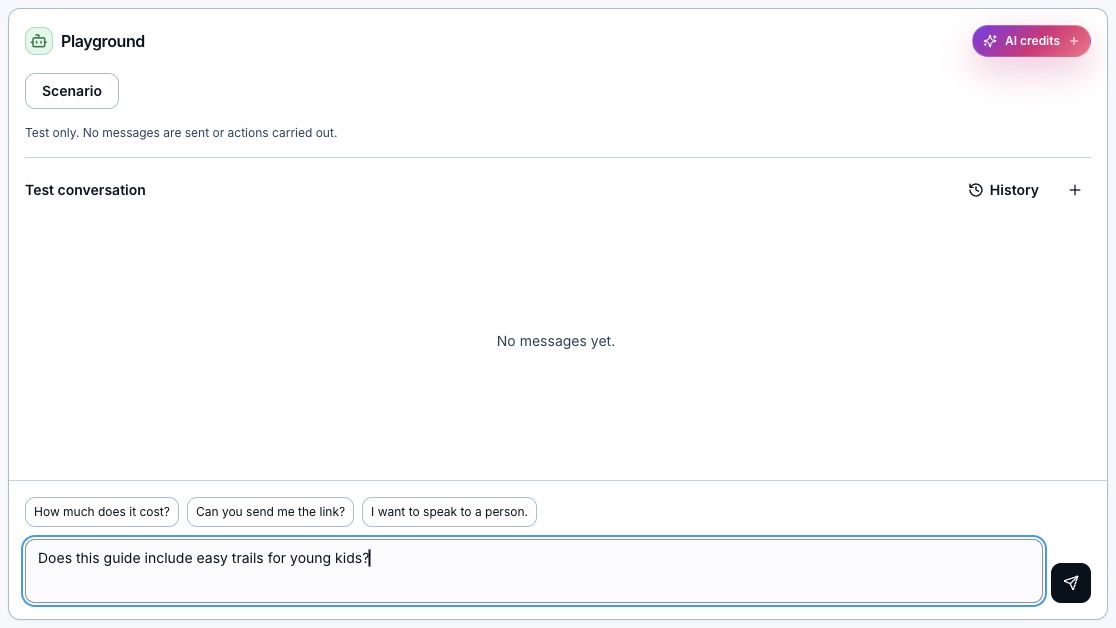
- Open the agent and choose Test agent. Select Direct message or Public comment; changing the channel starts a new test.
- Optionally open Scenario and describe the customer and situation in up to 2,000 characters. Model selection is inside the modal. Save applies changes; Cancel or Escape discards them. Changing or clearing a scenario after chatting starts a new conversation, keeps the earlier chat in History, and preserves your unsent message.
- Write a message a real fan might send.
- Type beneath the conversation and choose Send, or press Enter. Shift+Enter adds a line. Pending editor changes save first; testing stops if saving fails. Try How much does it cost?, Can you send me the link?, and I want to speak to a person. Reloading in the same browser tab preserves the test.
- Choose History to reopen and continue an earlier conversation for this agent. Chats are saved to your account, so you can also find them from another browser. Load older conversations to go further back. New test conversation starts fresh, clears the scenario, and keeps earlier chats in History. Ended or handed-over conversations remain readable; start a new one to keep testing.
- Read the reply in the chat. Break up long replies previews each bubble when enabled. Approval is simulated automatically; no messages or actions are sent to customers.
- Open reply details to inspect effective instructions, current configuration, evidence, tool outcomes, state, model, timing, and settled credits.
- If the reply is wrong, choose Improve AI. Describe what should happen instead, then review the suggested instruction and example reply. Edit the instruction if needed and create a feedback draft. This uses AI credits, but does not publish or send anything.
- Open the agent's Activity tab, then expand a Version history row to see added and removed instructions and changed settings. Actions appear inside the expanded row. Expand Compare versions to select the draft and live version, or any two saved versions. Publish the draft only after retesting. You can copy an older version to a new draft or make an archived published version live again for the next reply in existing and new conversations.
- Retest with messy wording, short questions, and questions the agent should refuse.
Start from an Inbox conversation
- Open an Instagram DM in Inbox and choose Test in Playground.
- Choose an agent, then Open Playground. The assigned agent is selected first; you can also choose a draft without publishing it.
- Review the copied recent messages and the latest customer text in the composer. Send to test a new reply. The original answer is excluded, and the real conversation is unchanged. Attachment-only or very long latest messages stay in history; type a message to continue the test.
- Continue testing and reopen the copy from History later. Original Inbox conversation returns to the live chat. Customer identity, purchases, fields, and action effects remain simulated; they are not copied from the contact. Opening the copy costs no AI credits; generating a reply uses the normal Playground credits.
Try different models
- Open Test agent, then Scenario. Choose the model you want to try and save.
- Send a message and review the reply, evidence, actions, and credit usage in Reply details.
- Choose another model in Scenario to continue the same conversation, or start a new conversation to compare the same situation from the beginning. Earlier conversations remain in History.
- When you are satisfied, choose the agent's saved intelligence in Settings, save your draft, and publish. Playground model overrides do not change the saved agent model. Publishing does not require saved test cases.
Give feedback on any agent output
- Choose Improve future replies on a review, or Improve AI beside an agent output in Inbox, Playground, or session details. This also works for links, buttons, action-only results, and decisions not to reply. Highlight a specific phrase first if you want to focus on it.
- Choose Never do this for a rule, Do this instead for a behavior change, or Change the tone for voice guidance. All three update the same Instructions document. Describe the problem and what should happen next time. The optional focus field can name a link, button, or action.
- Choose Preview changes. The suggestion uses your agent's billing choice and builds on its latest saved draft, or its published version if there is no draft. Review Changes to see added words in green and removed words in red with strikethrough. Choose Edit instructions to adjust the proposal, then return to Changes to review your edits.
- Choose Save draft to test later, or Publish changes to publish directly from the popup. Publishing includes the agent's other saved draft changes and keeps its active or inactive status. A failed publication leaves your feedback draft saved. Open Review agent draft to compare versions and test in the editor. Earlier drafts stay in version history. If the agent changes while you review, regenerate the suggestion or review the current draft before publishing.
- The next reply uses the newly published version while conversation history stays intact. Feedback does not stop an active agent, approve a pending reply, send the example, or undo an action. Use Take over in Inbox when you need to stop AI control immediately.
What good looks like
- Check that the reply uses assigned knowledge and does not invent an answer.
- Check that the agent shares the right Link when the person asks for it, and keeps it out of unrelated replies.
- Confidence and grounding are high for supported answers.
- Unsupported questions stage for review, hand off, use fallback, or skip based on your settings.
Related articles
Still need help?
Support & feedback