
How to review AI replies before sending
Use AI → Replies to review drafts, see sent agent replies, and check review history.
In this article
What lands here
AI → Replies → Needs review shows review-first agent replies, uncertain auto-send decisions, AI workflow steps, product matches, public comments, and handoffs that need a person. If the agent has no reply or action to propose, it skips the queue. Action-only approvals and handoffs can appear without reply text.
Quickly edit DMs and comments
- Open AI → Replies. Needs review opens first. Choose Sent to see delivered agent replies. Filter DMs & comments, DMs, or Comments.
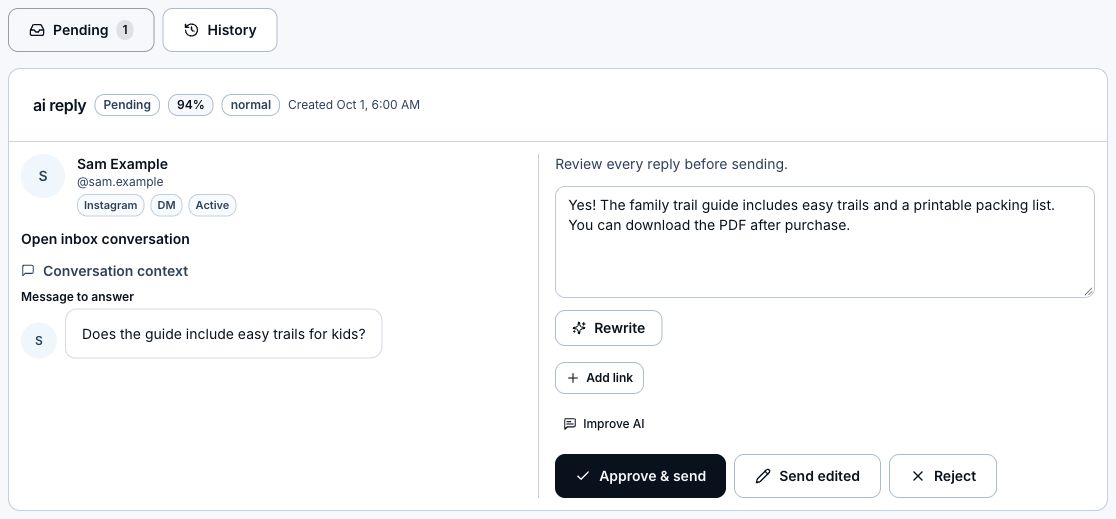
- Compare the person and available photo, incoming message or comment, original post, and reply. Edit a pending reply directly, then choose Approve & send. Editing alone does not save or send; refreshing or leaving can discard unsent edits.
- In Sent, edit a posted Instagram comment and choose Save replacement. LinkStack posts a new reply and removes the original. If it fails, your text stays in the editor with an error.
- Sent DMs cannot be edited in LinkStack. Choose Open inbox conversation to follow up, or Improve future replies to change future replies. Sent includes automatically delivered replies and each delivered message bubble.
- Use Load more for older replies. In Sent, Refresh loads new activity. Hidden or deleted contacts, failed/test sends, and deleted public replies are excluded from Sent. Review history keeps approval, edit, rejection, and failure records.
Approve from the dashboard
When items are pending, enabled accounts see a compact Review queue on the main Dashboard and AI → Agents. The card disappears when the queue is clear.
- Read the incoming message, proposed reply, and any actions included in the approval.
- Use the arrows to move between pending items.
- Click Approve & send to approve the displayed reply and actions, or Approve for an action-only turn. If actual action results require changed text, review the revised pending reply and approve it again. Completed actions do not repeat. The item leaves the card only when complete.
- If approval fails, the item stays visible with an error. Read the error before trying again.
- Choose Open queue for AI → Replies → Needs review, or Review details to open the selected item.
Steps
- Open Dashboard, then AI.
- Open Replies.
- Stay on Needs review.
- Read the incoming message or comment, contact details, and suggested reply.
- For public comments, check the available profile photo and original post preview. Choose the post to open it on Instagram when a link is available. Missing photos or post details do not block review.
- Edit the text directly, or choose Rewrite to request a specific wording change.
- For a pending DM, click the pencil beside an attached link, edit Button label, and choose Save. Labels can have up to 20 characters. Cancel or Escape keeps the previous label. Saving a label updates only the draft; approval sends the message.
- Click Approve & send. If executing included actions changes the reply, it stays pending: read and approve the revised text before sending.
- Click Reject when you do not want to send this reply. If asked, choose whether the agent should stay assigned to the chat.
- Open Sent for delivered agent replies, including automatic sends. Choose Review history to audit approved, edited, rejected, or failed reviews.
Reject a reply and choose whether to unassign
A customer declining an offer does not remove the agent or expire its pending reply. Review the draft and choose whether to keep the agent assigned. Explicit requests such as Stop contacting me still stop AI contact.
- Choose Reject on an agent draft in Needs review or the compact dashboard queue. In Inbox, choose Reject beneath the reply.
- If the draft's agent is still assigned to the chat, choose Keep assigned to reject only this reply and let the agent handle future messages, or Unassign agent to remove it from this chat. Cancel or Escape leaves the reply pending.
- To try again after rejecting all pending drafts, keep the agent assigned and click AI Reply beneath the latest incoming text in Inbox. The reply window must still be open. Drafts that already started sending or applying actions cannot be retried.
- Check Remember my choice before choosing either option to save that behavior to your account. Later rejections use it without asking. Without the checkbox, your saved preference stays unchanged.
- Open Settings → Inbox → AI reply rejection to change the preference. Choose Ask every time, Keep the agent assigned, or Unassign the agent. Changes save immediately.
- Replies with no matching assigned agent skip this question. A workflow AI Reply that runs once is completed when declined and does not unassign a separate chat agent. If unassigning fails after rejection, the error explains how to remove the agent using Chat agent in Inbox.
Ask AI to change a pending reply
- Choose Rewrite on a pending agent reply in Replies → Needs review, the compact dashboard queue, or the Review reply composer in Inbox.
- Describe what should change, such as Ask about their coaching goals or Avoid saying perfect for everyone. Any manual edits in the current draft are included.
- Choose Suggest rewrite. This uses the original reply’s saved model and billing choice: AI credits or its own API key. The suggestion replaces the draft in the editor and the request collapses. Choose View original to compare. Edit the suggestion directly, or choose Refine, add another instruction, and choose Revise suggestion.
- Choose Use rewrite to replace the local draft text, or Discard to keep the original. Buttons and actions stay as they are. The rewrite is not saved until you approve; refreshing or leaving can discard local edits.
- Read the updated reply and choose Approve & send when ready. This also sends any manual edits. Generating or using a rewrite never sends or approves the reply.
- Use Improve future replies in the footer when you want to change the agent's future behavior. Rewrite only changes this reply.
Use review to tune
- Repeated edits usually mean the agent needs clearer behavior instructions.
- Wrong links usually mean the source needs the correct URL and a clearer explanation of when to share it.
- Low confidence usually means knowledge is missing or too broad.
- Use the reply policy you selected; test automatic replies against the configured confidence and grounding thresholds.
Related articles
Still need help?
Support & feedback