
How to customize booking and product emails
Edit customer emails in the shared template editor. LinkStack keeps their triggers and secure action links protected.
4 min read
In this article
Edit a customer email
- Open Email from the dashboard and choose Templates.
- Open the System folder and find the message for Bookings, Orders, Memberships, or Reviews. Your reusable templates appear at the root or in your own Collections.
- Choose Edit template beside the message.
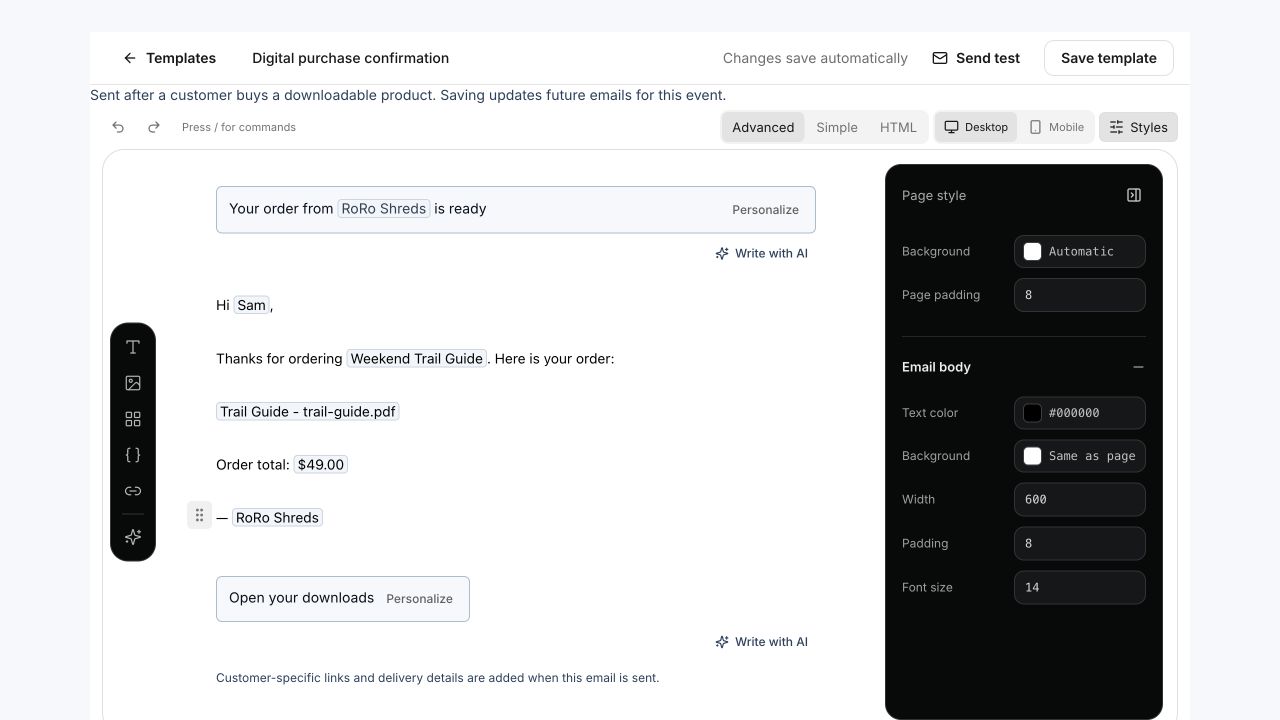
- Edit the Subject and Message. Edit the protected action button label directly in the canvas; its destination is supplied securely when sending. Use Personalize in the subject, message, or protected action label for variables supported by that event. Chips show sample values while saving keeps the original tokens. Use Send test to send a sample to an address you choose.
- Use the insert rail for content and the style inspector for appearance. On smaller screens, open Email styles to show the inspector.
- Check the live preview and protected action area. Changes save automatically. Incomplete customer-email edits remain saved for editing while live event emails keep the last complete version. Future matching emails use your completed design; the event trigger stays the same.
What stays protected
You can design the message while LinkStack keeps the event trigger, allowed variables, verified sending address, primary destination, secondary secure links, calendar attachment, unsubscribe destination where needed, and plain-text fallback attached at send time. Customer-specific actions appear as a protected area in the editor. Product and bio appearance themes do not recolor transaction emails.
Check the real email
- Save the template.
- Complete a test booking, registration, or purchase using an inbox you can check.
- Open the email on desktop and mobile, then confirm the sender name, subject, message, button, secondary links, and any calendar attachment.
- Return to the template and adjust the copy if the important details are not easy to scan.
Related articles
Still need help?
Support & feedback