
Choose which conversations appear in Inbox
Filter and sort conversations, save a default view, choose Inbox sources, and hide contacts individually or in bulk.
5 min read
In this article
Filter by fields and sort by tag
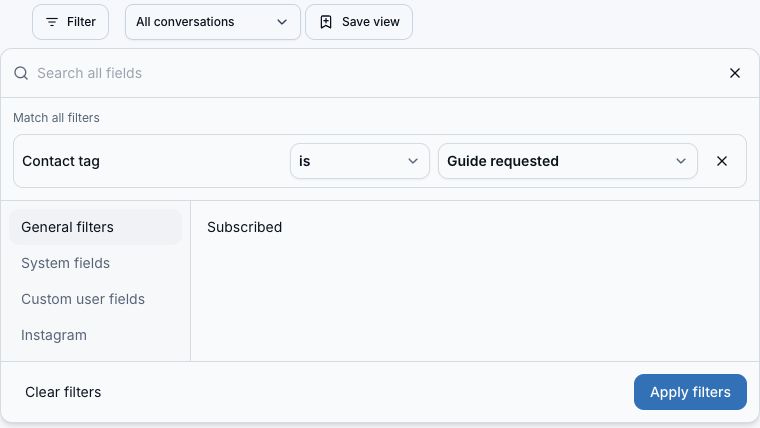
- Open Inbox and choose Filter. Select General filters, System fields, Custom user fields, or Instagram; Search all fields searches every category.
- Choose a field and its comparison. General filters includes Contact tag and Subscribed. System fields includes names, email, phone, and contact ID. Custom user fields uses active fields from Audience. Instagram includes username or ID, Last interaction, and Last seen.
- Enter a value or choose is empty or is not empty. Number fields also support greater than and less than; dates support before and after. Add up to eight conditions, then Apply filters. Every condition must match. Clear filters removes these conditions.
- Use the sort menu to choose Tag A–Z or Tag Z–A. The first alphabetical tag on each contact determines its position, ignoring case. Untagged contacts come last in both directions, and ties use the newest message first. Scrolling keeps the same order across all pages.
- Contact tags appear on conversation rows and are separate from conversation labels. Keep using the label picker for labels, Favorites, and Reminders.
Save a view and choose your default
- Apply the filters, label, channel, search, conversation status, and sort order you want to reuse. Search must be submitted before saving.
- Choose Save view, enter a unique name, and optionally check Use as my default inbox view. Choose Save view to store it in your account across browsers.
- Select the view from Inbox view. Bare Inbox opens your default, while explicit filters and direct conversation links take precedence. All conversations clears the saved configuration without reapplying the default.
- To change a selected view, adjust the inbox controls, then choose Edit saved view. An edited indicator marks unsaved settings. Rename the view or change its default checkbox and choose Update view to save the current configuration. Save view creates a separate copy instead.
- To remove a view, choose Edit saved view, Delete view, then Confirm delete. Deleting the default leaves no default. Conversations, labels, and contact tags stay unchanged. If saving fails, keep the form open and retry; your input stays in place.
Choose your Inbox sources
- Open Settings and choose Inbox.
- Find Inbox sources.
- Connected Instagram accounts with messaging access appear here. Analytics-only and disconnected accounts are not listed.
- Turn a listed network On to include it, or Off to exclude it. Changes autosave.
- Return to Inbox. The conversation list, labels, channel filters, and dashboard attention counts now use the saved choices.

What happens when you change Inbox sources
- Instagram covers DMs, story replies, and captured comments.
- Turning a source Off hides its saved conversations and removes them from Inbox attention counts.
- The account stays connected, history stays saved, and automations and Audience contact capture keep processing messages.
- Turn the source On again to restore its conversations.
Show or hide chat events
This only changes the event display. Messages and automations keep working as usual. If browser storage is blocked, the toggle works for the current visit but cannot be remembered.
- Open an Inbox conversation. System events start hidden.
- Choose Events beside the reply controls to load recent system events. Choose Load earlier events for more history, or choose Events again to hide them.
- Your choice stays saved across chats, refreshes, and later visits in this browser until you change it. Clearing site data resets it to off. Other browsers and devices keep their own choice.
Keep Inbox current across tabs
Contact details load when their sidebar or mobile panel is visible. Notes load when opened, and event history loads only while Events is on.
- Open Inbox to load the first 10 conversations. Scroll the list for more; messages appear as each conversation loads.
- Keep a tab visible for live updates. Returning to an idle tab or reconnecting automatically refreshes messages, lists, and counts.
- If the Inbox updates interrupted notice appears, restore your connection and choose Retry. The current conversation stays visible while a refresh is retried.
Hide one or more contacts
- For one contact, open Inbox, choose the conversation, and choose Hide chat in its actions.
- For several contacts, select their conversations with the checkboxes and choose Hide chats. The header checkbox selects all loaded conversations; scroll to load more. Confirm to hide those contacts and all their chats. Each contact is included once, even if several selected chats belong to them.
- Bulk hides save in batches of up to 250 contacts. If a batch fails, keep the dialog open and retry to skip completed batches. Earlier successful batches stay hidden; canceling does not undo them.
- Optional: select Don't show again before confirming. LinkStack saves that choice after the hide succeeds, then skips the warning for later hides in this browser.
- After hiding, Inbox opens the next visible conversation using your current filters and sort order. At the end of the list, it opens the previous conversation. If none remain, the conversation panel clears.
- To restore the contact, open Audience, choose the Hidden filter, and unhide them. Clearing LinkStack's browser data makes the hide warning appear again.
Related articles
Still need help?
Support & feedback