
How to add UTM campaign stuff to a link
Add source, medium, campaign, term, and content tags to a Link without breaking affiliate tags.
4 min read
In this article
What it does
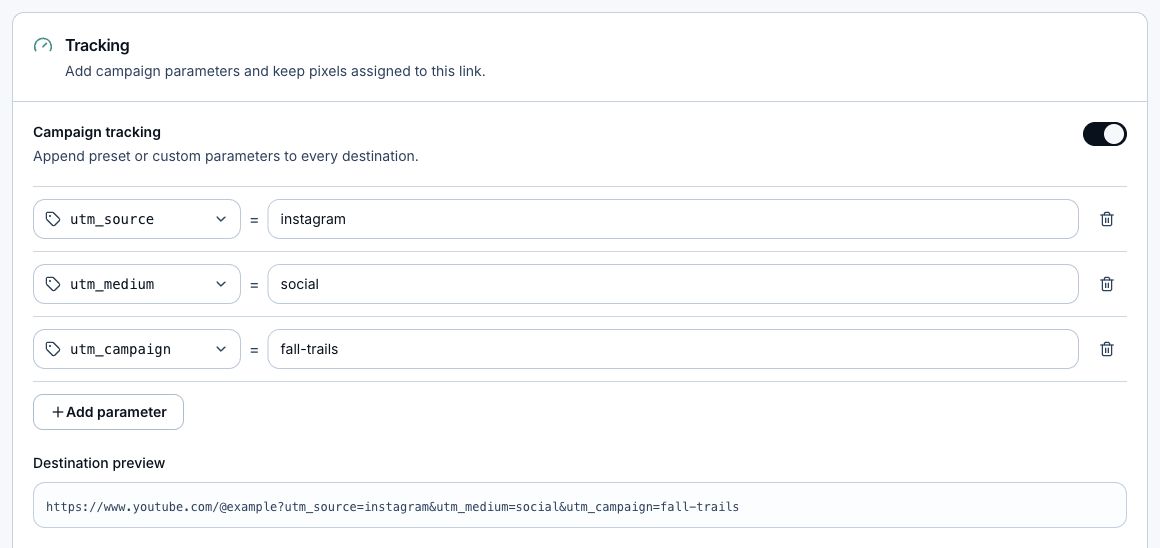
Campaign tracking adds UTM parameters to the Link's default and country destinations. LinkStack preserves affiliate tags and updates existing UTM values when you save new ones.
Steps
- Open Links.
- Choose the Link.
- Open Routing.
- Expand Tracking.
- Turn on Campaign tracking.
- Fill in Source, Medium, and Campaign.
- Add Campaign term or Campaign content if you need them.
- Review the Generated long URL.
- Click Save tracking.
Naming tips
- Use lowercase names like instagram, tiktok, bio, story, or spring-drop.
- Keep campaign names readable enough to understand later.
- Use content for placements, buttons, or creative variations.
- Use term mostly for paid keywords.
Related articles
Still need help?
Support & feedback