
How app-first deep links and fallbacks work
Open the destination in a supported mobile app, with a web fallback when the app cannot open.
In this article
Preview your first link
- Open the Deep Links feature page and paste a direct video, product, playlist, or other destination URL.
- Choose Preview my link. Review the detected app and web fallback; an unsupported destination shows that it will open on the web.
- Choose Save my free link, then sign up or log in. Your destination is saved in this browser so you do not need to paste it again. If storage is blocked, allow site storage and retry first.
- Finish signup in the same browser within 24 hours. LinkStack creates your link on the Links page and shows Copy link when it is ready.
- For an optional link ending, open Customize in the preview and continue to your account. Custom endings follow your plan’s access. Affiliate setup appears only for Amazon links.
The app-first flow
- LinkStack starts with the final routed destination after country, affiliate, campaign, path, query, and fragment handling.
- For a supported provider and mobile device, LinkStack uses that destination to open the matching app.
- A custom app destination can override automatic detection when you use a verified deep-link format.
- Desktop visitors continue to the normal web destination.
Share Amazon storefronts, lists, and shopping pages
Storefronts, lists, registries, collections, and other non-product pages keep their exact destination, query parameters, and fragment. Attaching an Amazon program does not turn them into product searches or substitute another country's storefront. A configured affiliate tag is applied only when it belongs to the destination's marketplace; otherwise the existing tag is kept. Guided affiliate setup selects the source country and keeps its valid tag when that market is offered in Programs. Review both before saving. App-opening coverage does not add affiliate-program markets or establish Associates enrollment.
- Paste an Amazon storefront, idea list, product, registry, wish list, collection, search, or deals URL. Amazon Shopping app opening covers 23 marketplaces, including India, Ireland, Belgium, Turkey, Egypt, and South Africa.
- You can also paste amzn.to, a.co, amzn.eu, amzn.asia, amzn.in, or link.amazon. LinkStack tries to expand the share URL first. Supported shares on the first five domains can use Amazon's native app links when lookup fails; unresolved link.amazon shares keep their web destination.
- Leave Mobile behavior on and save. For existing links with it turned off, enable it and save before testing app opening.
- Test on a phone with Amazon Shopping installed, then check the web fallback. Desktop visitors keep the same web destination. Amazon's explicit browser-only links stay on the web, including generated country destinations and search fallbacks.
Supported music links
- Spotify supports direct tracks, albums, artists, playlists, shows, and episodes.
- YouTube Music supports direct videos, channels, playlists, and browse pages.
- Amazon Music supports its public music destinations, and Apple Music supports direct songs, albums, artists, playlists, music videos, and stations.
- Audiomack supports public artist profiles, songs, albums, and playlists. Creator dashboards, uploads, account pages, and sign-in routes stay on the web.
Share Twitch app destinations
- Create a Link with a Twitch channel, /videos/ VOD, legacy /channel/v/ VOD, /channel/videos feed, /directory/game/ game name, /directory/following, /login, /directory/tags/ tag, or /directory/all/tags/ tag URL. Twitch's homepage opens the app. Use an encoded game name such as Just%20Chatting; modern /directory/category/ slugs are not converted to guessed game names.
- You can also paste any format from Twitch's Mobile Deep Links guide directly, including twitch://open, twitch://stream/channel, twitch://game/Just%20Chatting, twitch://video/v1234567, twitch://channel/channel, twitch://following, twitch://login, and both directory tag formats. The alternate open?stream=, open?game=, open?video=, and open?channel= forms select the same destinations.
- To open broadcast setup, paste twitch://broadcast?game_id=509658, replacing the number with your game's ID. LinkStack saves the explicit app destination and uses Twitch's homepage as the web fallback. Opening setup does not start a broadcast; the visitor completes that in Twitch.
- Leave Mobile behavior on, save, and test the shared Link on iOS and Android with Twitch installed. Following may open login if the visitor is signed out. Desktop visitors and unavailable apps get the web fallback. Native app inputs are saved as explicit app targets; editing only the web destination changes their fallback, not their Twitch action. Create a new Link to change that action.
- Clip URLs and unsupported Twitch pages stay on the web. LinkStack does not send them to a different channel. The preview confirms a recognized format; test on a phone to check that the app opens.
Share Wattpad stories, profiles, and chapters
- Paste the direct Wattpad story, author profile, or chapter URL when creating a Link. Reading lists, short share links, and account pages are not supported for automatic Wattpad app opening.
- Leave Mobile behavior on and save. Stories and profiles can open in Wattpad on iOS and Android. For chapters, LinkStack looks up the parent story when you save; a failed lookup keeps the chapter on the web.
- Test the saved Link on a phone with Wattpad installed, then check the web fallback. A preview confirms a supported URL format. It cannot confirm a successful chapter lookup or that the app will open.
Share Substack, Babylist, Venmo, and GitHub links
- Paste the full destination URL when creating or editing a Link. Substack supports publication posts, profiles, Notes, open.substack.com post shares, and on.substack.com shares. Publication homepages and custom domains stay on the web.
- For Babylist, use a /list/ registry link, /gp/ product link, /store page, or Hello Baby article. Root registry slugs stay on the web, including root slugs on my.babylist.com.
- For Venmo, use a /u/ profile on venmo.com or account.venmo.com, a venmo.com/code link with its user_id, or an existing venmo.com/payment/ link. LinkStack keeps payment parameters unchanged; the visitor completes any payment in Venmo.
- For GitHub, use a profile, repository homepage, or individual issue, pull request, or repository discussion. Code files, settings, and unsupported profile tabs stay on the web.
- Leave Mobile behavior on and save. Test the saved Link on iOS and Android with the destination app installed, then check the original web fallback. A supported preview does not confirm that the app opened.
When the app does not open
The visitor continues to the web destination when the app is unavailable, the URL format is not supported, app routing is off, the device is disabled, or the operating system or social browser blocks the app from opening.
Fallback choices
- External browser fallback helps traffic leave a social in-app browser and continue in Safari or Chrome when Mobile behavior is on.
- In-app browser fallback keeps the visitor inside Instagram, Facebook, or TikTok when Mobile behavior is off.
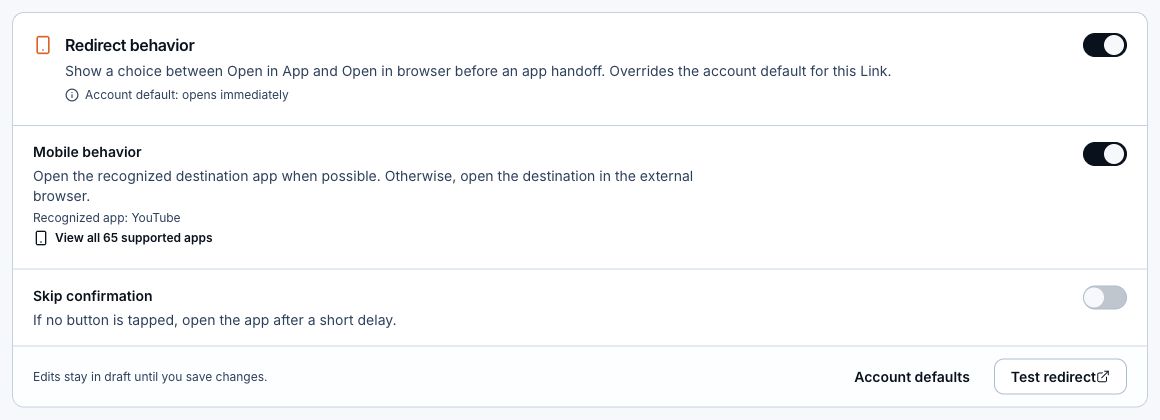
- The Redirect behavior switch controls the choice screen before opening an app. With Mobile behavior off, the choice screen and its app timer are skipped.
- Save changes before testing the public Link. Turning Mobile behavior off keeps country destinations, affiliate tags, campaign parameters, and eligible tracking pixels working.
Configure app routing
- Open the Link and find Redirect behavior.
- Confirm the final web destination works first.
- Turn Redirect behavior on to show its options.
- Leave Mobile behavior on to try a supported app and external-browser fallback, or turn it off to keep the destination in the current browser.
- While Mobile behavior is on, leave Skip confirmation off to wait for a button tap, or turn it on and choose an app-opening delay.
- Save changes, then test the public Link on real devices.
Related articles
Still need help?
Support & feedback