
How to organize automations with Collections
Group automations in nested Collections and see the combined activity for each folder and its subfolders.
3 min read
In this article
Create and browse Collections
- Open Dashboard, then Automations.
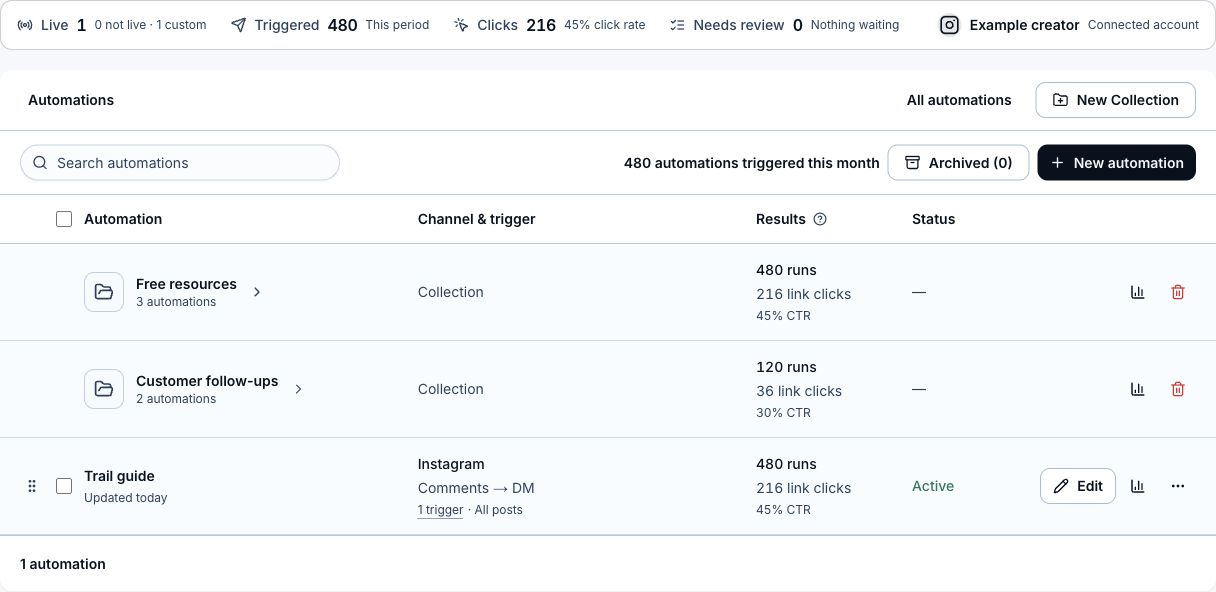
- Click New Collection. It is created at the top level, or inside the Collection you currently have open.
- Open a Collection row and use the breadcrumbs to move back through its parents.
Move automations
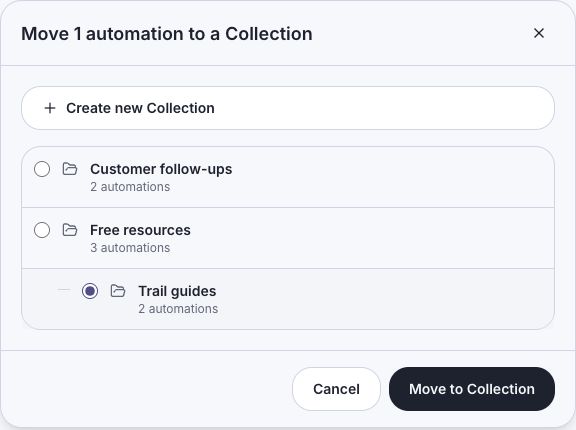
An automation can be in one Collection at any depth. Drag a row onto a visible Collection, or select one or more rows and choose Move to Collection. The move dialog shows the full nested hierarchy. Moving an automation replaces its previous Collection.
Review and remove Collections
- Collection rows include automations from nested Collections in their automation, trigger, and click totals.
- Click Analytics on a Collection row to open its rolled-up automation report.
- Deleting a Collection leaves its automations unassigned and moves its immediate child Collections to the top level.
Related articles
Still need help?
Support & feedback